Basic Static Analysis
Room 1 of 6 in the Static Malware Analysis module on SOC Level 2, and the first room in a while where the artefact under the microscope is a file rather than a log. No Splunk, no Zeek, no PCAP, a FLARE VM with six unlabelled binaries in Desktop\Malware named 1 through 6, and a rule that none of them get executed. Everything below comes out of four tools that read bytes and never run them: strings.exe, FLOSS, ssdeep, capa and PEstudio.
If the last few SOC Level 2 rooms were about following an attacker through telemetry, The Silent Transfer being the most recent, this one is the other half of the job: the sample lands on your desk with no context, and you have to say something useful about it before anyone lets it near a sandbox. It also pairs neatly with the much older Basic Malware RE room, which covers the same instincts at a gentler pace.
A note on the lab itself before the tasks: the samples have no file extension, which is deliberate. Windows will not execute a file with no extension by double-click, it will offer an “Open with” dialog instead. That is the only thing standing between a careless click and a live infection, so treat the Explorer window in that folder with the same care you would treat a loaded weapon. I selected all seven items by accident at one point (typing into Explorer with the file list focused acts as a jump-to-name search, and a stray keystroke selected everything) and had to back out with Escape before pressing Enter.
Task 1 and 2: The lab, and why the snapshot matters
Nothing to answer in either task, but the framing is worth keeping. The room’s argument for a lab machine is not “malware might escape” so much as “malware definitely changes the box”. Static analysis is the phase where you have not changed anything yet, so the discipline is: extract everything you can from the file at rest, and only then decide whether the sample is worth burning a snapshot on.
The attached VM is FLARE VM, Mandiant’s Windows analysis distribution. It boots to a desktop with PEstudio, FLOSS, Capa, SSDEEP and a Malware folder, and RDP credentials are printed in the task in case the split-screen VNC view is unusable. I worked entirely through the browser VNC session.
One practical thing: the room text says the samples live in a folder called mal, but on the machine I was given the folder is Malware, which is what the actual questions reference. Follow the questions, not the prose.
Task 3: String search, and the strings that are not there
The question asks what interesting string FLOSS recovered from sample #6 that regular strings.exe could not see.
strings.exe (the Sysinternals one, on PATH in FLARE VM) works the way strings does on Linux: it walks the file looking for runs of printable ASCII or UTF-16 characters and prints them. That only finds strings that exist as literal, contiguous bytes in the binary. Malware authors defeat it in two cheap ways, encoding the string and decoding it at runtime, or building it one character at a time onto the stack so it never exists in the file as a sequence at all.
FLOSS (FLARE Obfuscated String Solver) handles both. It emulates the binary’s own decoding routines and reconstructs stack strings, then prints four separate sections: static ASCII, static Unicode, decoded, and stackstrings.
Running it against sample 6 takes about seventy seconds, so I sent it to a file and grepped the section headers rather than scrolling 8,600 lines:
:: run FLOSS on sample 6 in the background, output to a file
start "floss6" /min cmd /c "FLOSS.exe 6 > C:\Users\Administrator\Desktop\floss6.txt 2>&1"

:: plain strings.exe finds nothing
strings.exe -n 6 Malware\6 | findstr /i dbgview

:: FLOSS section headers, with line numbers
findstr /n /c:"FLOSS" floss6.txt
1:FLOSS static ASCII strings
8554:FLOSS static Unicode strings
8562:FLOSS decoded 1 strings
8565:FLOSS extracted 45 stackstrings

:: and how many of those stackstring lines are the interesting one
findstr /c:"Dbgview.exe" floss6.txt | find /c "Dbgview.exe"
38
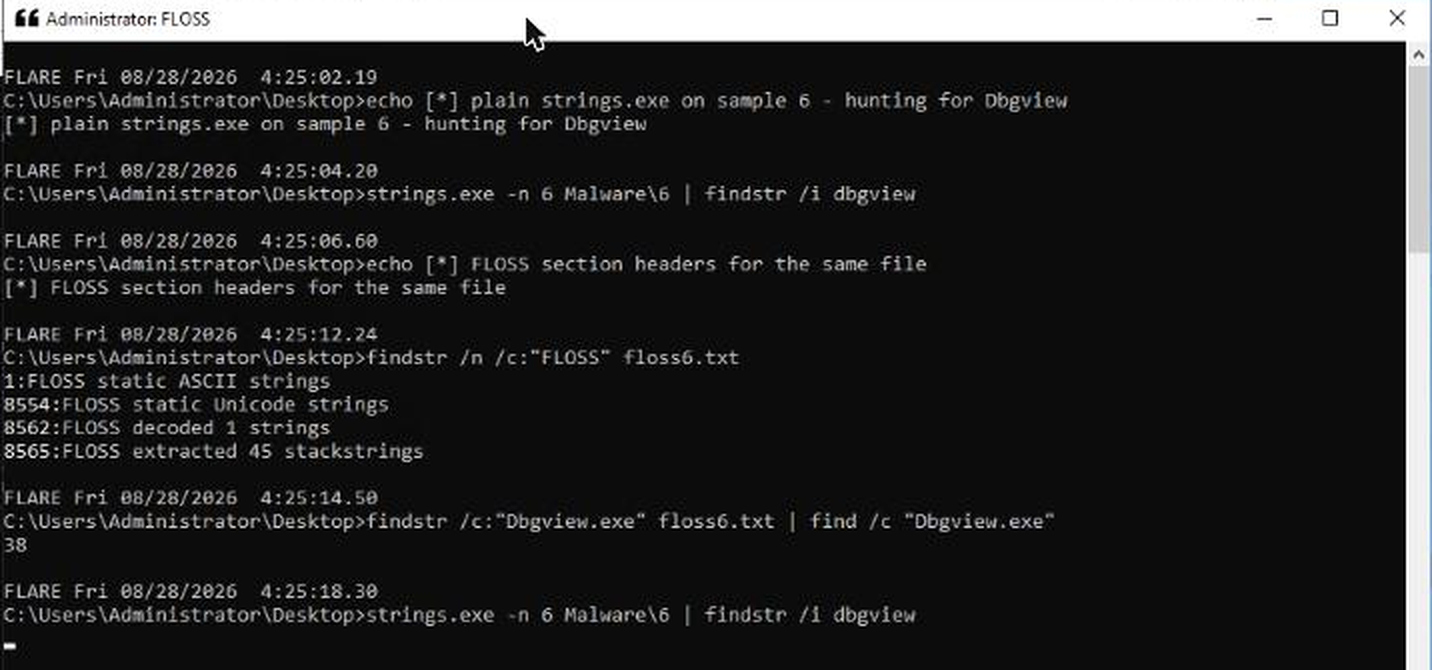
That contrast is the whole lesson of the task. strings.exe on sample 6 returns nothing at all for dbgview. FLOSS pulls it out 38 times from the stackstrings section. The answer is Dbgview.exe.
It is worth knowing why that string matters. DebugView is the Sysinternals tool that captures OutputDebugString output; malware that looks for a running Dbgview.exe process is doing analyst detection, checking whether it is being watched before it does anything interesting. The string being built on the stack rather than stored as a literal is itself the tell: nobody obfuscates a filename they are not ashamed of.
The decoded 1 strings section, by contrast, is a red herring here. It contains @@AD, four bytes of nothing. FLOSS’s emulation found a decoding routine and ran it, but what came out is not a meaningful indicator. Report what is useful, not what the tool produced.
Task 4: imphash and ssdeep, two ways to say “these are related”
Two questions: the imphash shared by samples #1 and #3, and their ssdeep similarity score.
An import hash (imphash) is an MD5 over the list of DLLs and functions a PE imports, in the order the linker wrote them. It says nothing about a file’s content, two files with identical imphash can differ completely in their code, but because the import table is a by-product of how a binary was built, a shared imphash is strong evidence that two samples came off the same build chain. It is a family indicator, not an identity one.
FLARE VM ships Python 3.7 with pefile, so the whole set is one line:
C:\Users\Administrator\Desktop\Malware>python -c "import pefile;[print(f, pefile.PE(f).get_imphash()) for f in '123456']"
1 f40e8f975cf118eadd4d99d120d05f77
2 f34d5f2d4577ed6d9ceec516c1f5a744
3 f40e8f975cf118eadd4d99d120d05f77
4 40eca657b39e53d64484aac9561aed0e
5 f34d5f2d4577ed6d9ceec516c1f5a744
6 bcf64127f7c96f713a04ecde911df2eb
Samples 1 and 3 share f40e8f975cf118eadd4d99d120d05f77. Note also that 2 and 5 share a different imphash, the room only asks about the first pair, but the six samples are clearly three families plus two singletons, and that grouping is free information you would want in a real triage note.
ssdeep answers a different question. It is a context-triggered piecewise hash: it splits the file at content-defined boundaries, hashes each piece, and concatenates the results, so two files that share most of their bytes produce visually similar hashes even if their lengths differ. Comparing them gives a 0-100 similarity score.
The room shows ssdeep.exe Malware\* to print hashes, but printing hashes does not answer “how similar are these two”. The -d flag does, it compares every file on the command line against every other and prints only the pairs that match:
C:\Users\Administrator\Desktop\Malware>..\SSDEEP\ssdeep.exe -d 1 3
C:\Users\Administrator\Desktop\Malware\3 matches C:\Users\Administrator\Desktop\Malware\1 (93)
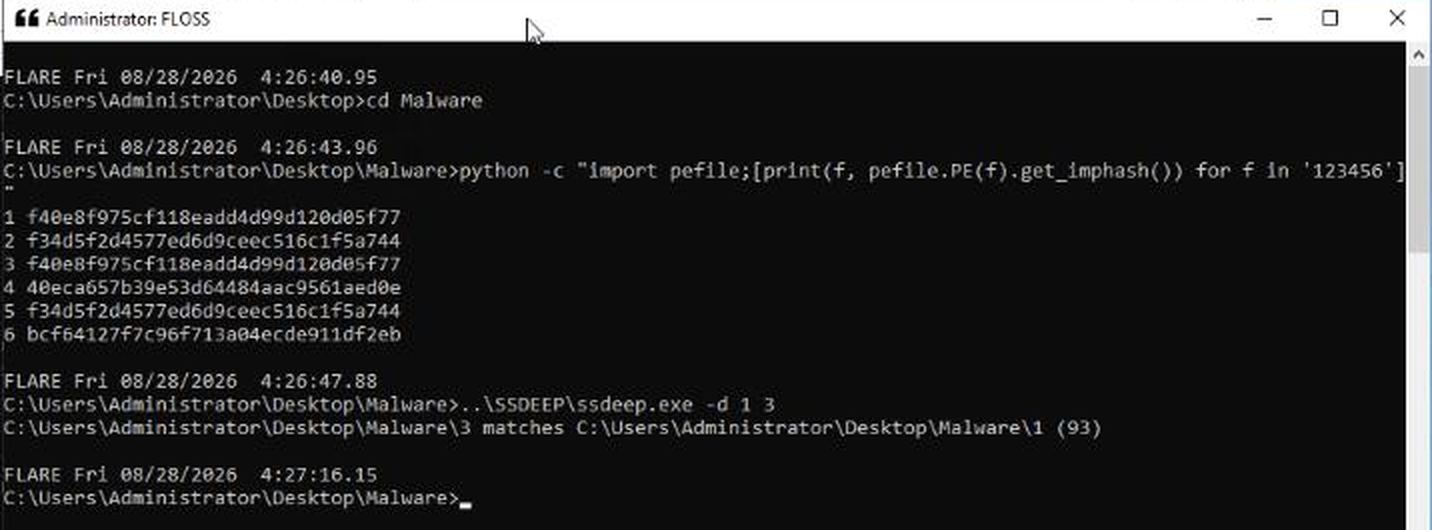
The score is 93. Same imports and 93/100 byte-level similarity: samples 1 and 3 are almost certainly two builds of the same thing, differing by a configuration blob or a recompile.
Task 5: capa, and reading the MBC column
Four questions, all against sample #4. capa is Mandiant’s capability-detection engine: it disassembles the binary, matches a few hundred rules against the instructions and API calls it finds, and reports what the sample can do, mapped to both MITRE ATT&CK and the Malware Behavior Catalog.
Sample 4 takes about four minutes, so again: background it, then query the report.
start "capa4" /min cmd /c "capa 4 > C:\Users\Administrator\Desktop\capa4.txt 2>&1"
How many anti-VM execution techniques were identified? capa reports it as a single capability with a match count:
| ANTI-BEHAVIORAL ANALYSIS  | Debugger Detection::Process Environment Block BeingDebugged [B0001.035]  |
|                           | Debugger Detection::Process Environment Block NtGlobalFlag [B0001.036]  |
|                           | Debugger Detection::Software Breakpoints [B0001.025]                    |
|                           | Virtual Machine Detection::Human User Check [B0009.012]                 |
|                           | Virtual Machine Detection::Instruction Testing [B0009.029]              |
| ANTI-STATIC ANALYSIS      | Disassembler Evasion::Argument Obfuscation [B0012.001]                  |

check for unmoving mouse cursor        | anti-analysis/anti-vm/vm-detection
execute anti-VM instructions (86 matches) | anti-analysis/anti-vm/vm-detection
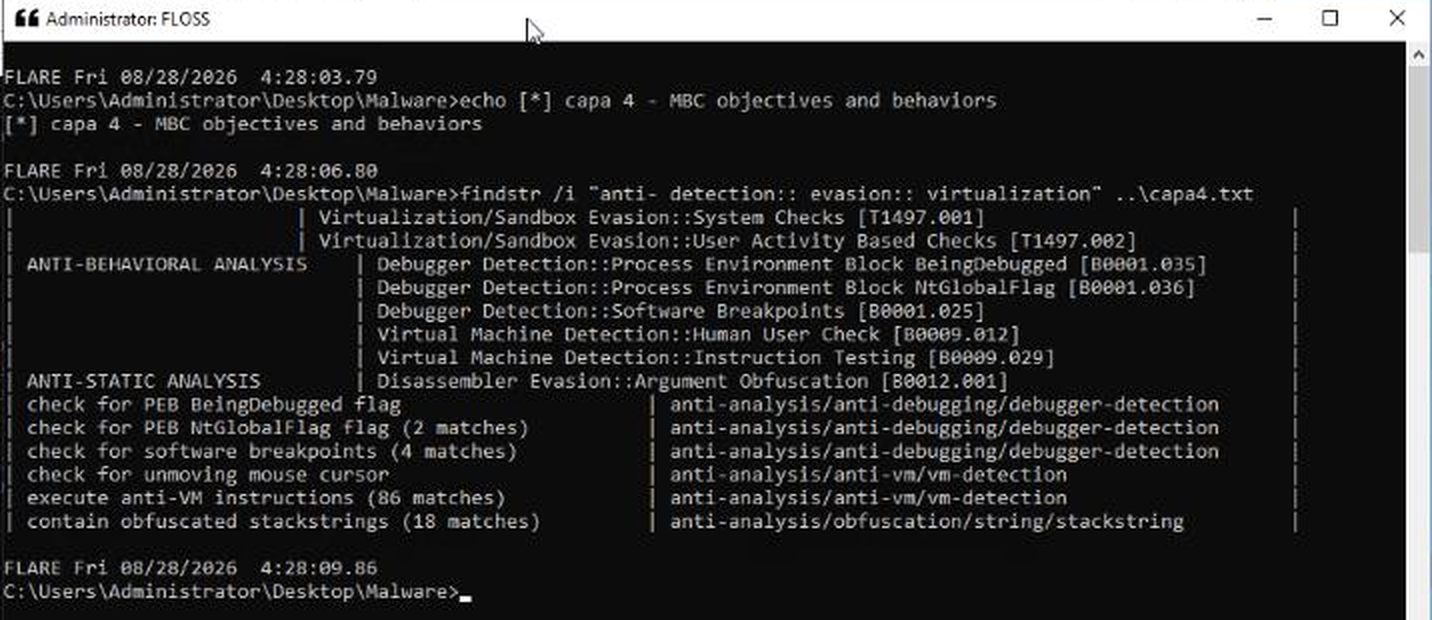
The answer is 86, the match count on execute anti-VM instructions, not the two rules in the anti-vm namespace. I read the question the other way first, and what settled it was the answer box: TryHackMe pre-fills each input with an underscore mask showing the exact character count, and this one was two characters. 2 is one character; 86 is two. Reading the mask before submitting is the cheapest sanity check in the whole platform, and it is easy to miss because the mask lives in the input’s value, not its placeholder.
Does the sample persist via a Run registry key? and can it create or edit scheduled tasks? Both answered from the same report:
C:\Users\Administrator\Desktop\Malware>findstr /i "persist autostart" ..\capa4.txt
| PERSISTENCE  | Boot or Logon Autostart Execution::Registry Run Keys / Startup Folder [T1547.001] |
| persist via Run registry key                    | persistence/registry/run                        |

C:\Users\Administrator\Desktop\Malware>findstr /i "schedul task" ..\capa4.txt
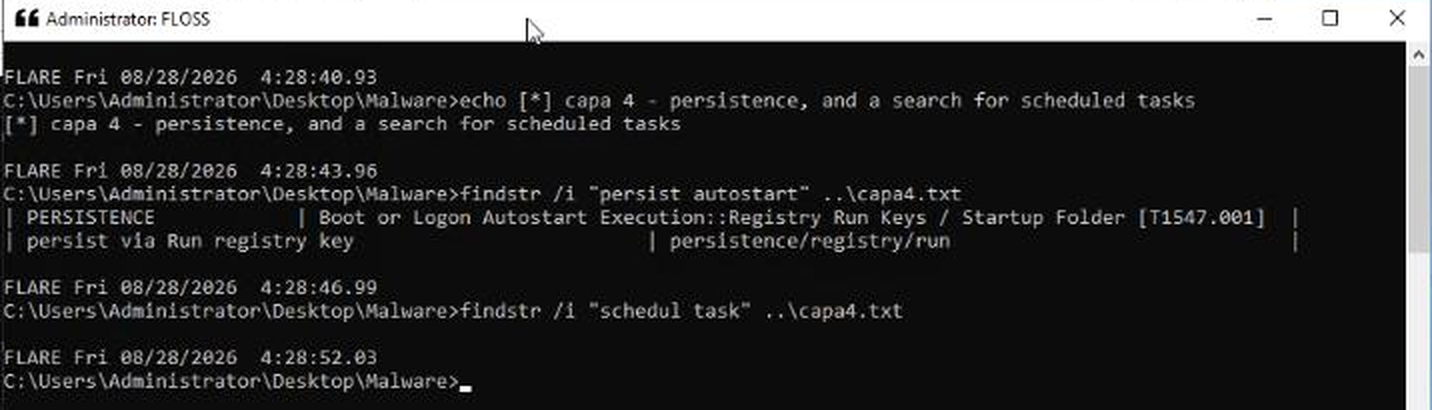
Run key: Yea. Scheduled tasks: Nay, the second search returns nothing at all. capa has rules for persistence/scheduled-task/*; none of them fired.
What MBC behavior ID is observed against the objective “Anti-Static Analysis”? One row, one ID: B0012.001, Disassembler Evasion::Argument Obfuscation. That is the sample deliberately constructing call arguments at runtime so a disassembler cannot resolve them, which, pleasingly, is the same trick that hides strings from strings.exe in Task 3, viewed from the code side rather than the data side.
The verbose run (capa -v 4) is worth doing once even though it answers nothing extra. It confirms the anti-VM matches are basic block scope and lists all 86 addresses, which is how you convince yourself the count is real rather than a rule matching one pattern repeatedly by accident.
Task 6: PEstudio, and the library nobody imports on purpose
Two questions against sample #4 again: which library PEstudio flags as suspicious, and which function is imported from it.
PEstudio parses the PE and cross-references everything it finds against blacklists, libraries, imported functions, strings, section names. Its value is not that it shows you the import table (any tool does) but that it tells you which entries are statistically unusual for benign software.
Launching it with the sample as an argument is the fast path, and it needs the path resolved from your current directory:
C:\Users\Administrator\Desktop>start pestudio Malware\4
The libraries node shows nine imports, eight of them the ordinary Win32 furniture, KERNEL32.dll, USER32.dll, GDI32.dll, comdlg32.dll, WINSPOOL.DRV, ADVAPI32.dll, SHELL32.dll, COMCTL32.dll. The ninth carries a red x in the flag column: RPCRT4.dll, the Remote Procedure Call Runtime Library, with an import count of exactly 1.
The same shape is visible from the command line, which is how I captured it for this writeup after the PEstudio window stopped responding to clicks over VNC:
C:\Users\Administrator\Desktop\Malware>python -c "import pefile;[print(d.dll) for d in pefile.PE('4').DIRECTORY_ENTRY_IMPORT]"
b'KERNEL32.dll'
b'USER32.dll'
b'GDI32.dll'
b'comdlg32.dll'
b'WINSPOOL.DRV'
b'ADVAPI32.dll'
b'SHELL32.dll'
b'COMCTL32.dll'
b'RPCRT4.dll'

C:\Users\Administrator\Desktop\Malware>strings.exe 4 | findstr /i "rpcrt4 uuidcreate"
UuidCreate
RPCRT4.dll
Guid::Generate() - UuidCreate failed!
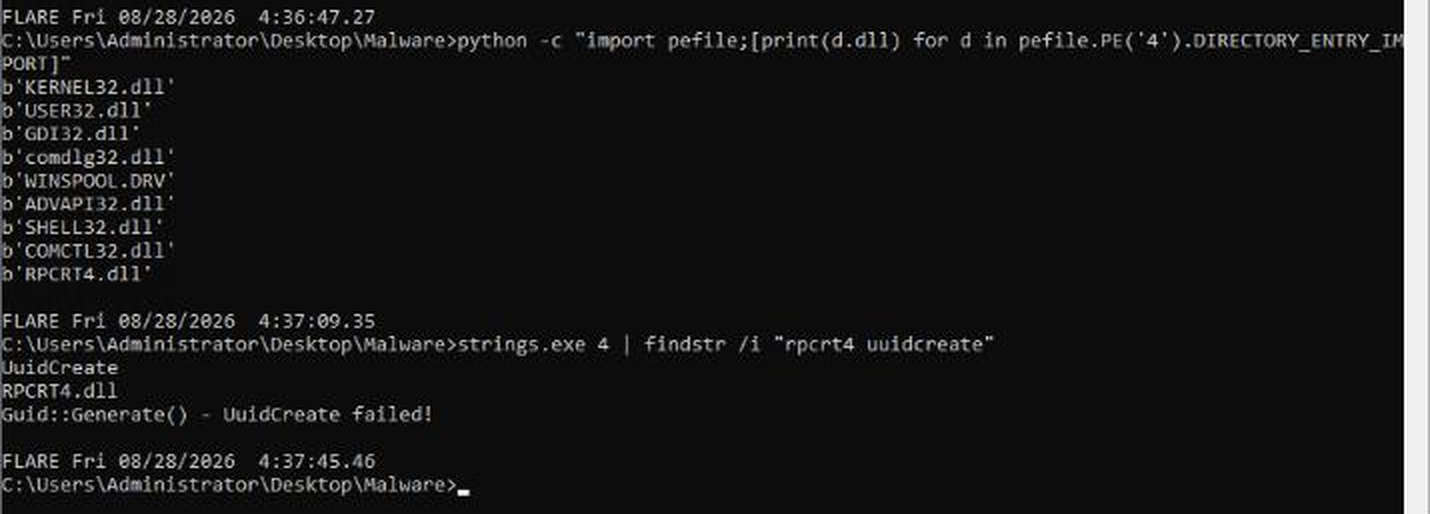
The single function is UuidCreate. The third line even leaks the developer’s own error message, Guid::Generate() - UuidCreate failed!, which tells you what it is for: generating a GUID. Malware uses that to mint a unique victim identifier for C2 check-ins, or a mutex name that guarantees one instance per host.
Is UuidCreate malicious? No. It is a documented Windows API used by an enormous amount of legitimate software. That is exactly the point of a PEstudio flag: it is a “look here” marker, not a verdict. A GUI program that imports a single RPC function and carries an error string about generating GUIDs is worth ninety seconds of attention; on its own it convicts nobody.
Two other things PEstudio surfaced on this sample that the room does not ask about but a real triage note would carry: the file description is mediamonitor gui, and the debug directory still holds the original PDB path D:\Dev\Money\Reminder\Reminder\win95\AceMoneyReminder.pdb. A binary that calls itself a media monitor and was built from a source tree called Money\Reminder is a mismatch worth writing down.
Task 7: Conclusion
What actually mattered
A tool returning nothing is a finding, not a failure. The Task 3 answer only becomes convincing when you run strings.exe first and watch it come back empty. Same for Task 5’s scheduled-task question, findstr /i "schedul task" returning zero lines is the answer, and it is a stronger answer than reading the report and not noticing the row is absent. Get in the habit of running the negative control; it converts “I did not see it” into “it is not there”.
The underscore mask is free format intelligence, and it is not in the placeholder. THM pre-fills every answer box with a mask showing exact character counts and punctuation. On this room it disambiguated 86 from 2, and it confirmed Dbgview.exe, B0012.001 and RPCRT4.dll character-for-character before I spent a submission on them. Reading it via the DOM shows it lives in the input’s value attribute, document.querySelectorAll('input') and look at .value, not .placeholder, which is what tripped me up when I went looking for it.
One honest note on process: driving a Windows GUI over TryHackMe’s browser VNC is unreliable under load. Keystrokes get dropped mid-command, tree-view clicks land without selecting, and a single click on a grouped taskbar button can spawn a dozen console windows. Everything in this writeup was verified twice, once in the GUI and once from the command line, and the PEstudio evidence above is the command-line reproduction, because the GUI window stopped accepting clicks before I could capture it cleanly. If you are working this room, do the reading in the GUI and the extraction from cmd; the GUI is better at telling you what to look at, and the shell is better at proving it.
Room solved 100%: 7 tasks, 8 answers, 72 points.