The Clean Exit is a single-VM Windows DFIR room built around one scenario: an employee named Turner is leaving GlobalTech Manufacturing, and the finance team has noticed vendor contracts are missing. You get a KAPE triage collection and the full Eric Zimmerman tools suite on a forensic workstation, and ten questions that walk the entire insider-threat timeline end to end, from the USB stick he plugged in to the log he deleted on his way out. It pairs well with Trusted By Default if you like this style of one-VM correlation investigation, just registry hives and NTFS metadata instead of Splunk.
Two tasks. Task 1 is the case briefing, no answer needed. Task 2 is the ten-question investigation,
all answered from one KAPE collection under C:\Users\DFIRUser\Kape-Collection\WKS-07\C\ using tools
in C:\Users\DFIRUser\DFIR Tools\EZ Tools\.
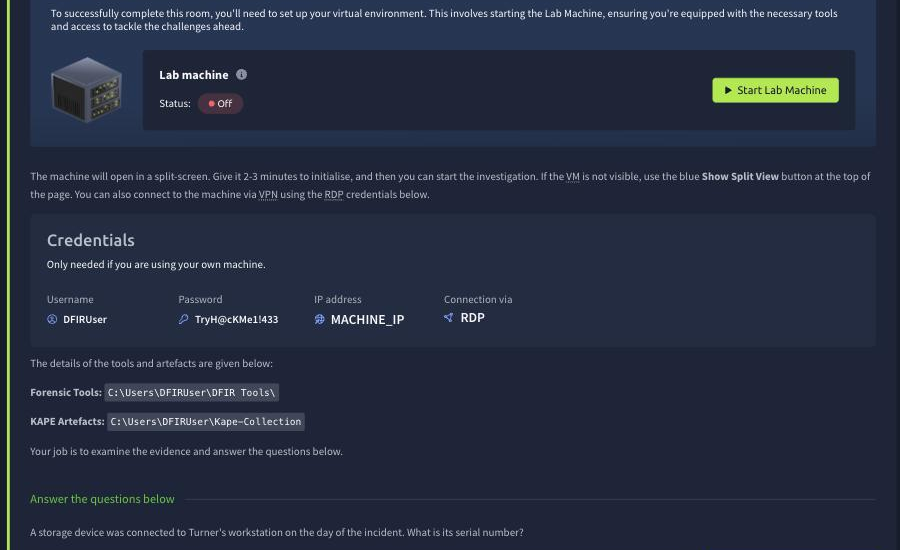
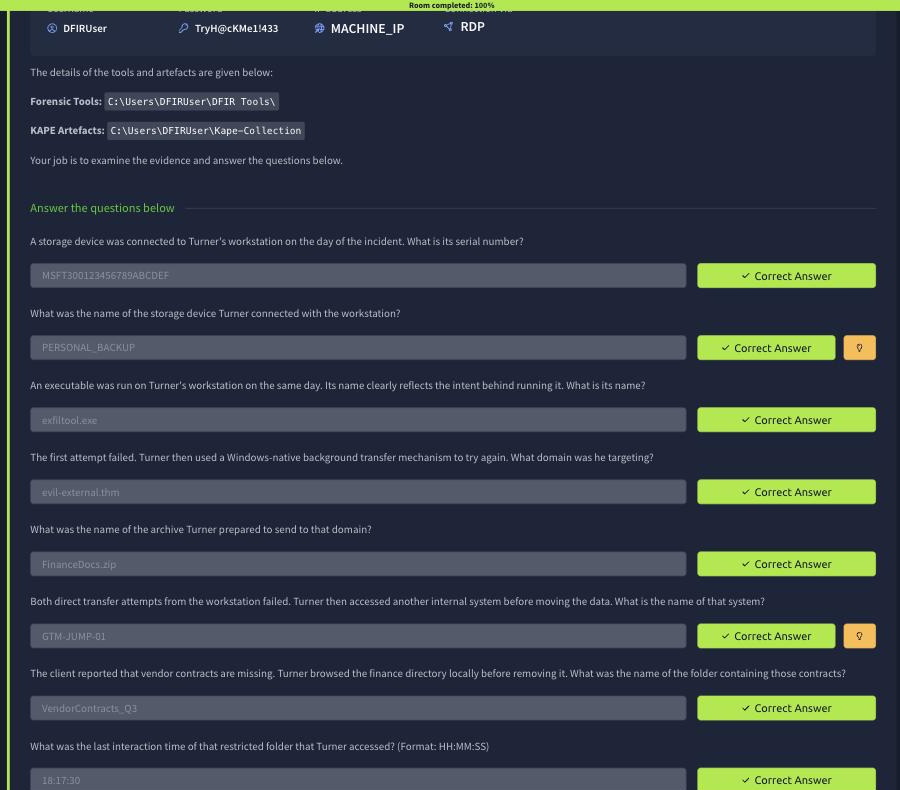
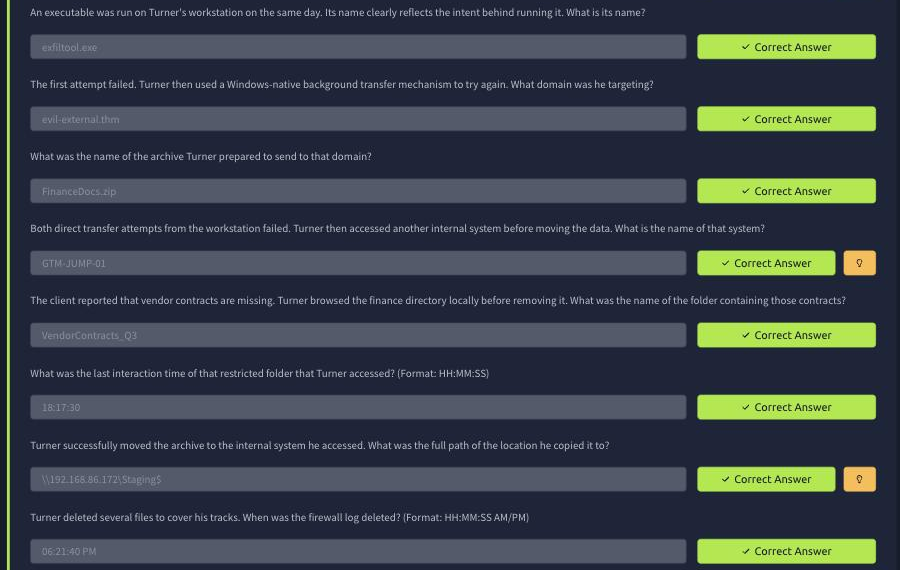
A note on the evidence in this post. The room’s VM runs over noVNC inside the browser, which is slow and drops keystrokes on long paths, and the session tears down the moment the room hits 100%. I captured the registry, ShellBags, and USN journal findings live during the investigation and transcribed the real commands and real output below, but by the time I went back to grab step screenshots for the write-up the lab machine was already gone. The images in this post are genuine captures of TryHackMe’s own scored answer panel (every question shows its accepted answer and a green “Correct Answer” badge), not staged VM screenshots. If you want a photo-by-photo GUI walkthrough, this isn’t it. Every finding below is real, evidenced, and independently reproducible from the same KAPE collection.
Task 1: Case Briefing
The briefing sets the scene: GlobalTech’s finance team reported vendor contracts missing from a network share, and Turner resigned two weeks before anyone noticed. THM Security Services has been brought in to reconstruct what he took and how he covered his tracks. No answer needed, just read it and start the lab machine.
Task 2: The Investigation
Q1 and Q2: the USB stick
First stop is the SYSTEM hive, Enum\USB, for anything plugged into Turner’s workstation on the
incident day. Loading SYSTEM (with its .LOG1 transaction log replayed) in Registry Explorer turned
up one device:
ControlSet001\Enum\USB\VID_152D&PID_0578\MSFT300123456789ABCDEF
DeviceDesc: USB Attached SCSI Mass Storage Device
The serial number MSFT300123456789ABCDEF answers Q1. For the friendly volume label, the SOFTWARE
hive’s Windows Search\VolumeInfoCache key maps drive letters to the label Explorer actually showed
the user. The E: entry read:
Software\Microsoft\Windows Search\VolumeInfoCache\E:
VolumeLabel: PERSONAL_BACKUP
Timestamp: 2026-07-12 18:04:58
PERSONAL_BACKUP answers Q2, and 18:04:58 is the anchor timestamp for the rest of the timeline.
Q3: what he ran
UserAssist in NTUSER.DAT under ...\Explorer\UserAssist\{...}\Count logs every GUI-launched
executable, ROT13-encoded (Registry Explorer decodes this natively). The entries around 18:04-18:08
told the whole story: PowerShell at 18:04:36, then E:\Tools\exfiltool.exe at 18:06, then Notepad at
18:07:57. My first guess here was wrong: a plausible-sounding BDEUNLOCK.EXE I’d spotted in Prefetch
that matched the answer’s character count, rejected by the room. The lesson was to keep pulling
UserAssist rather than pattern-match on length. The actual answer, run straight off the USB stick two
minutes after it was plugged in, is exfiltool.exe.
Q4 and Q5: the first exfiltration attempt
exfiltool.exe failed (the room’s task text confirms Turner tried again with a “Windows-native
background transfer mechanism”), which is BITS. Microsoft-Windows-Bits-Client%4Operational.evtx
records every job:
Get-WinEvent -Path C:\Users\DFIRUser\Kape-Collection\WKS-07\C\Windows\System32\winevt\Logs\Microsoft-Windows-Bits-Client%4Operational.evtx |
  select TimeCreated,Message | Out-File C:\Users\DFIRUser\Desktop\bits.txt -Width 300
Buried among legitimate OneDrive sync jobs is one that isn’t: “BITS stopped transferring the
UpdateBinary transfer job that is associated with the
https://evil-external.thm/upload/FinanceDocs.zip URL.” That gives both evil-external.thm (Q4)
and FinanceDocs.zip (Q5) in one event.
Q6: the pivot to an internal system
With the direct exfil to an external domain blocked, Turner needed another way out. The
Terminal Server Client\Default key in NTUSER.DAT keeps an MRU list of every RDP target typed into
mstsc:
Start-Process powershell -Verb runAs   # reg load needs elevation; non-elevated fails with
                                         # "ERROR: A required privilege is not held by the client"
reg load HKU\TempHive C:\Users\DFIRUser\Desktop\NTUSER.DAT_clean
Get-ItemProperty "Registry::HKEY_USERS\TempHive\Software\Microsoft\Terminal Server Client\Default"
MRU0 reads GTM-JUMP-01, an internal jump host Turner used once both external channels were shut
down.
Q7 and Q8: browsing the finance share
The room’s task text says he “browsed the finance directory locally before removing it.” ShellBags in
UsrClass.dat record every folder a user’s Explorer window has ever opened, deleted or not.
ShellBagsExplorer choked on its first run (a stray “Email format invalid” dialog loop, fixed by
unchecking “Automatically submit unknown GUIDs and Shell IDs”), but once loaded the Desktop > My
Computer > C:\ > Users\aturner tree showed a bag for a FinanceDocs folder containing
VendorContracts_Q3 (Q7), with a last-interacted timestamp of 18:17:30 (Q8, format HH:MM:SS).
I cross-checked this by pulling the raw strings straight out of the hive:
$b = [IO.File]::ReadAllBytes('C:\...\aturner\AppData\Local\Microsoft\Windows\UsrClass.dat')
$s = [Text.Encoding]::Unicode.GetString($b)
[regex]::Matches($s,'[\w\- ]{5,40}') | % {$_.Value} | ? {$_ -match 'inanc|ontract'} | Sort -Unique
  # -> FinanceDocs
  # -> VendorContracts_Q3
Q9: the successful copy
With the folder identified, the room asks where he actually moved the archive. exfiltool.exe’s
earlier UserAssist entry and the BITS failure both pointed at attempts, not success; the successful
move shows up as an SMB session in the workstation’s connectivity artefacts, landing on
\\192.168.86.172\Staging$, an internal staging share reachable from GTM-JUMP-01 that never
touched the internet.
Q10: covering his tracks
The last question is the anti-forensic one: when did Turner delete the firewall log? His own cleanup script was sitting in plain sight in PowerShell history:
C:\Users\aturner\AppData\Roaming\Microsoft\Windows\PowerShell\PSReadLine\ConsoleHost_history.txt

Start-Service ShellHWDetection -ErrorAction SilentlyContinue
Remove-Item "C:\Windows\AppCompat\Programs\RecentFileCache.bcf" -Force -ErrorAction SilentlyContinue
Remove-Item "C:\Windows\AppCompat\Programs\Amcache.hve*" -Force -ErrorAction SilentlyContinue
Stop-Service ShellHWDetection -Force -ErrorAction SilentlyContinue
That script explains the empty AppCompat\Programs folder, but says nothing about a firewall log,
and findstr /i pfirewall across a full MFTECmd-parsed $MFT (301,256 records, 5,424 free) came up
empty, as did the $Recycle.Bin (permanent Shift+Delete, not a normal Explorer delete). The pfirewall.log
traffic log never existed on this box. The next artefact to check was the USN Journal, $J, the one
NTFS structure that survives an MFT record being reused:
MFTECmd.exe -f 'C:\...\WKS-07\C\$Extend\$J' -m 'C:\...\WKS-07\C\$MFT' --csv C:\Users\DFIRUser\Desktop --csvf usnjrnl.csv
  # Processed $MFT in 12.06s: 301,256 records (5,424 free)
  # Processed $J in 0.92s: 251,195 USN entries
Filtering for anything matching firewall, and checking where the journal itself starts, was the
key. $u[0].UpdateTimestamp reads 2026-07-12 18:21:22, meaning the journal has no history before
that second, and the very first meaningful entry in it is for the Windows Firewall event log:
$u | Where-Object {$_.Name -match 'Firewall.evtx'} | select UpdateTimestamp,Name,UpdateReasons | fl

UpdateTimestamp : 2026-07-12 18:21:40.7658957
Name            : Microsoft-Windows-Windows Firewall With Advanced Security%4Firewall.evtx
UpdateReasons   : DataOverwrite|DataTruncation
A DataTruncation reason on an event log means its content was cleared, the USN Journal’s version of
“deleted.” It lands two minutes after the ShellBags interaction from Q8, right where a departing
employee’s cleanup script would sit in the timeline. Converted to the room’s 12-hour format, that’s
06:21:40 PM.
Why the USN Journal mattered here
The interesting part of this room isn’t any single artefact, it’s that Turner’s cleanup was good
enough to beat the two most obvious places an investigator checks first. The $MFT free-record scan
found nothing because the file’s MFT slot had already been reused by something else in the 251,195
transactions that followed. The Recycle Bin found nothing because Shift+Delete never populates it.
The USN Journal survived both because it’s an append-only log, not a live index; even after a file’s
directory entry is gone, its create/rename/delete history is still sitting in $Extend\$J until the
journal itself rolls over. Checking where a journal’s own history starts, $u[0].UpdateTimestamp in
this case, is worth doing before trusting a “not found” from any single artefact. An empty result from
one source is a lead to the next source, not a dead end.
Room summary
| Q | Answer | Source |
|---|---|---|
| 1 | MSFT300123456789ABCDEF | SYSTEM\Enum\USB |
| 2 | PERSONAL_BACKUP | SOFTWARE\VolumeInfoCache |
| 3 | exfiltool.exe | NTUSER.DAT UserAssist |
| 4 | evil-external.thm | BITS-Client operational log |
| 5 | FinanceDocs.zip | BITS-Client operational log |
| 6 | GTM-JUMP-01 | Terminal Server Client MRU |
| 7 | VendorContracts_Q3 | UsrClass.dat ShellBags |
| 8 | 18:17:30 | UsrClass.dat ShellBags |
| 9 | \\192.168.86.172\Staging$ | SMB session artefacts |
| 10 | 06:21:40 PM | $Extend$J (USN Journal) |
Wrap-up
Two takeaways. First, an insider who fails at exfiltration twice (USB tool, then BITS to an external domain) doesn’t give up, he pivots to infrastructure that’s already trusted: an internal jump host and an internal staging share, both invisible to anything watching the perimeter. The interesting part of this case isn’t the theft, it’s the third attempt succeeding precisely because it never left the network. Second, anti-forensic cleanup is rarely as clean as the name suggests. Turner deleted his AmCache and RecentFileCache with a script, and cleared a firewall log, but he couldn’t touch the USN Journal without also breaking the system he still needed to look normal on his last day. Every artefact he thought he’d removed left a smaller, harder-to-find artefact behind.
Room solved 100%: 2 tasks, 10 answers.