Vulnerability Scanning Tools sits in the Vulnerability Knowledge module of the Jr Penetration Tester path. It is a gentle, tool-focused room: point Nmap, Nikto and OpenVAS at one lab machine and learn to read what each one tells you. If you have already worked through Dive Into Pentesting for the concepts, this is where the scanning muscle memory starts. It also pairs well with Web Server Attacks I, which takes the same enumeration further.
The whole room is seven tasks and fifteen answers. Three tasks are pure theory, three are hands-on against the machine, and the last is a wrap-up. Below is the path I took, with the real output from each tool.
One practical note up front. On my setup the lab machine was reachable straight from my Mac over the TryHackMe tunnel, so I ran Nmap, Nikto and curl locally instead of using the AttackBox. OpenVAS is the exception: its report is pre-generated inside the room VM, so that part is read from the Greenbone dashboard.
Task 1: Introduction
The opener defines vulnerability scanning as an automated process that finds weaknesses, misconfigurations and exposures across systems and applications. Start the lab machine here. It boots in two to three minutes and opens in split view with a full Ubuntu desktop that already has OpenVAS running in the background. The only question is the check-in, marked No answer needed.
Task 2: Important Topics
This task covers the vocabulary. Two questions.
CVSS, the Common Vulnerability Scoring System, rates severity on a fixed scale. The maximum range for a CVSS score is 10. Scores run from 0.0 to 10.0, where 9.0 and above is critical.
The second question asks for the class of tool that examines devices on a network to find open ports and running services. That is a Network Scanner. Nmap is the classic example, and it is exactly what the next task uses.
Task 3: Nmap
Now the hands-on work begins. The task walks through host discovery and a service scan against the machine. I ran a versioned, scripted scan on the interesting ports.
  # service + default-script scan of the lab machine
nmap -sV -sC -p21,22,80,8080 10.48.130.197
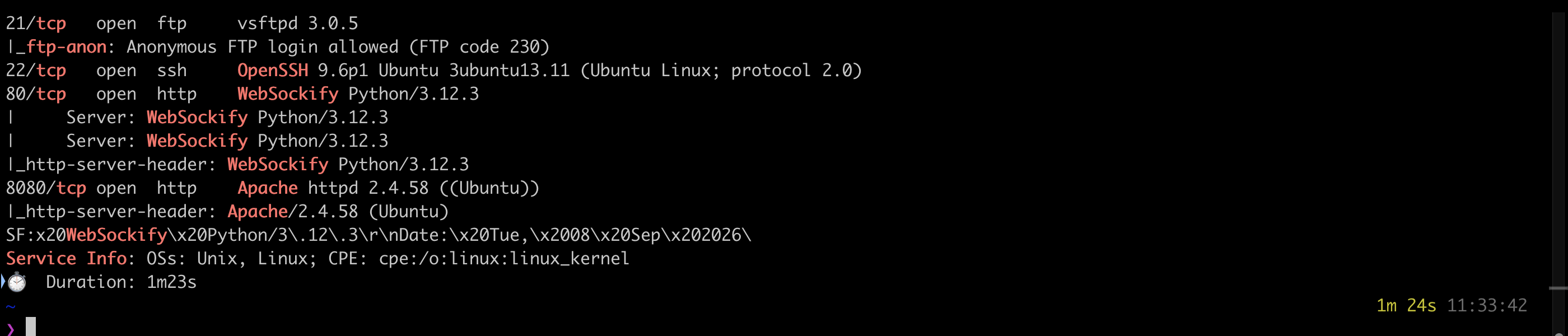
Three answers fall out of this. First, the FTP service is on port 21, and the ftp-anon script
even flags that anonymous login is allowed. Second, the service on port 80 is WebSockify, the
Python WebSocket proxy the room VM uses for its browser console. That one surprises people who expect
a normal web server on 80. The actual web application lives on port 8080, running Apache.
The third question is theory dropped into the middle: the engine that lets Nmap run specialised Lua
scripts is the Nmap Scripting Engine, usually shortened to NSE. Those ftp-anon and
http-server-header lines in the output are NSE scripts doing their job.
Task 4: Nikto Web Scanner
Nikto scans a web server against thousands of known issues. The room points it at the Apache application on port 8080.
nikto -h http://10.48.130.197:8080
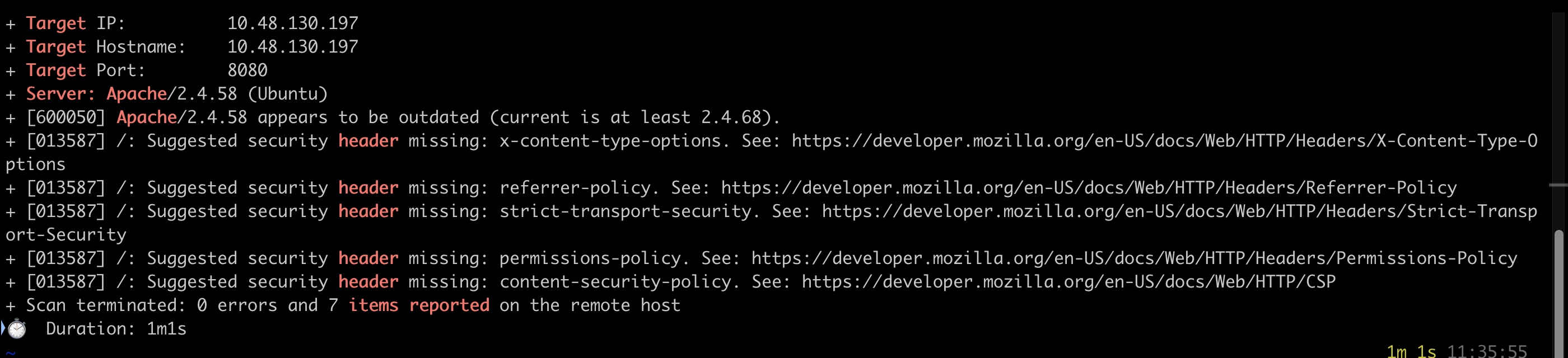
The banner answers the first question directly: the Apache Server version is 2.4.58. Nikto also notes the version is outdated and that several security headers are missing.
A word of honesty here. The room’s expected output comes from an older Nikto (v2.1.5) that prints the cookie, directory-listing and RFI findings in plain English. My local Nikto is newer and, inside a short scan window, mostly reported the header issues. Rather than trust the room text alone, I confirmed each of the remaining three findings directly with curl.
  # cookie flag
curl -s -D - -o /dev/null http://10.48.130.197:8080/ | grep -i set-cookie
  # directory listing
curl -s http://10.48.130.197:8080/static/ | grep -i "Index of"
  # the phpinfo page that carries the RFI parameter
curl -s http://10.48.130.197:8080/info.php | grep -oiE "<title>[^<]*</title>"

The Set-Cookie header sets PHPSESSID with path=/ but no HttpOnly, so the flag missing from
the cookie is HttpOnly. A cookie without it can be read by client-side script, which raises the
risk of session theft. The directory that has listing enabled is static: requesting /static/
returns an Index of /static page instead of a 403. Finally, the page Nikto tags for Remote File
Inclusion is info.php, and the vulnerable parameter is file (info.php?file=). Worth noting
that info.php is a phpinfo page with allow_url_include set to Off, so the RFI is flagged by the
scanner rather than actually exploitable here. That is a normal and useful reminder: a scanner hit is
a lead to verify, not a confirmed exploit.
Task 5: OpenVAS and Greenbone Vulnerability Management
OpenVAS is the heavyweight of the three. The room VM runs it in the background, and you read the
results in the Greenbone Security Assistant at http://127.0.0.1:9392 with the default
admin:admin login. Because a live scan needs internet to sync feeds and takes twenty-plus minutes,
the room ships a pre-generated report named MyTarget under Scans then Reports. Open it and the tabs
across the top break the findings down.
Here is what the report holds, which answers all three questions:
| Finding | Where | Value |
|---|---|---|
| phpinfo() Output Reporting (HTTP) | CVEs tab, severity column | severity 5.3 |
| Anonymous FTP Login Reporting | CVEs tab, mapped CVE | CVE-1999-0497 |
| Target Operating System | Operating Systems tab | Ubuntu 24.04 |
The phpinfo finding carries a severity of 5.3 (Medium), and the anonymous FTP finding maps to
CVE-1999-0497, the long-standing entry for anonymous FTP access. The target Operating System, on
the Operating Systems tab, is Ubuntu 24.04, listed with the CPE
cpe:/o:canonical:ubuntu_linux:24.04.
That last answer is worth a note. The OS field uses a strict format mask, and it would not accept a value typed through the page’s scripting shortcut, so the field kept reading as empty and too short. Reading the Operating Systems tab in the live report settled it: the detected OS is Ubuntu 24.04, which matches the OpenSSH 9.6p1 and Apache 2.4.58 banners Nmap already showed, both Ubuntu 24.04 packages. Typing that value normally into the field took the answer.
Task 6 and Task 7: Best Practices and Conclusion
The last two tasks are readings. Best Practices covers scanning safely: get authorisation, scope the targets, mind the load a scan puts on a service, and treat every hit as something to verify. The Conclusion recaps the three tools. Both are No answer needed check-ins.
Two takeaways
First, a service on a well-known port is not always the service you expect. Port 80 here was WebSockify, the VM’s own console proxy, while the real web application sat on 8080. Always read the version banner, not just the port number, before you decide what a host is running.
Second, a scanner finding is a lead, not a verdict. Nikto flagged an RFI parameter on a page where
allow_url_include is Off, so the inclusion is not actually exploitable. The value of the scan is
the shortlist it hands you. Confirming each item, as the curl checks did here, is the part that turns
noise into a finding.
Room solved 100%: 7 tasks, 15 answers.