Walking An Application
The opener to the Web Application Security Fundamentals module on the Jr Penetration Tester path. Where Guided Pentest: Web has you exploit a live box, this one is about the habit that comes before any exploit: manually reviewing a web application with nothing but the tools already built into your browser. No scanner, no Burp, just view source, the element inspector, the JavaScript debugger, the network panel and storage.
The target is a deployed website (http://MACHINE_IP) for a fake company, Acme IT Support. It was reachable directly from my Mac over the THM tunnel, so I worked the flags with curl from the terminal, which reads exactly the same bytes the browser dev tools show you. The screenshots below are the real site rendered in the browser, since seeing the pages is the whole point of the room. Answers are grouped by dev-tools feature.
Task 2: Exploring The Website
Before any tooling, you map the interactive parts. The site’s customer portal is where tickets live, and the endpoint for creating a new ticket is /customers/ticket/new. The answer mask was decisive here: it renders as /*********/******/***, which is three path segments of exactly 9, 6 and 3 characters. customers is 9, ticket is 6, new is 3, and nothing else on the site fits that shape.
  # the mask segment lengths settle the path before you ever submit
mask="/*********/******/***"
python3 -c "print([len(s) for s in '$mask'.split('/') if s])"   # [9, 6, 3]
One honest note: requesting /customers/ticket/new directly returns 404, because the live “Create Ticket” modal actually POSTs to /customers/tickets. The room grades the semantic endpoint, not the modal’s form action, and the 9/6/3 mask is what confirms which string it wants.
Task 3: Viewing The Page Source
Four flags, all readable in the raw HTML the server sends, which is what “View Source” (Ctrl+U) shows you before any JavaScript runs.
The HTML comment flag is not the flag itself but a breadcrumb. The homepage source carries a developer comment pointing at an unlinked page:
T=10.49.139.248
curl -s "http://$T/" | grep -oE '<!--[^>]*-->'
  # <!-- This page is temporary while we work on the new homepage @ /new-home-beta -->
curl -s "http://$T/new-home-beta" | grep -oE 'THM[{][^}]*[}]'
  # THM{HTML_COMMENTS_ARE_DANGEROUS}
So T3Q1 is THM{HTML_COMMENTS_ARE_DANGEROUS}. The lesson is literal: comments are shipped to the client, and a comment that leaks a path is a finding.
The secret link flag is the same idea. The homepage source contains a hidden link to /secret-page that never appears in the rendered navigation. T3Q2 is THM{NOT_A_SECRET_ANYMORE}, and the mask (3, 1, 6, 7) matches NOT_A_SECRET_ANYMORE exactly.
The directory listing flag comes from the /assets/ path having directory listing enabled, so the web server hands you an index of every file in it, including a flag.txt that was never meant to be browsable.

curl -s "http://$T/assets/flag.txt"
  # THM{INVALID_DIRECTORY_PERMISSIONS}
T3Q3 is THM{INVALID_DIRECTORY_PERMISSIONS} (7, 9, 11 characters, exactly the mask).
The framework flag is the most instructive. Every page footer carries a comment: Page Generated ... using the THM Framework v1.2. Visiting that framework’s own website and reading its change log shows the current version is 1.3, and that 1.3 fixed a specific bug.

The site runs 1.2, so it is still vulnerable: the backup process left a world-readable /tmp.zip in the web root. Download it and the framework flag is inside.
curl -s "http://$T/tmp.zip" -o /tmp/backup.zip
unzip -p /tmp/backup.zip | grep -oE 'THM[{][^}]*[}]'
  # THM{KEEP_YOUR_SOFTWARE_UPDATED}
T3Q4 is THM{KEEP_YOUR_SOFTWARE_UPDATED} (4, 4, 8, 7). Identifying the framework, then reading its public change log to learn what an outdated version exposes, is a real methodology, not a trick.
Task 4: Developer Tools, Inspector
News article 3 (“3 Tips for keeping your printer working”) is gated behind a “This Article Is For Our Premium Customers” overlay. That overlay is a div with class premium-customer-blocker, drawn on top of the article that is already fully present in the page.
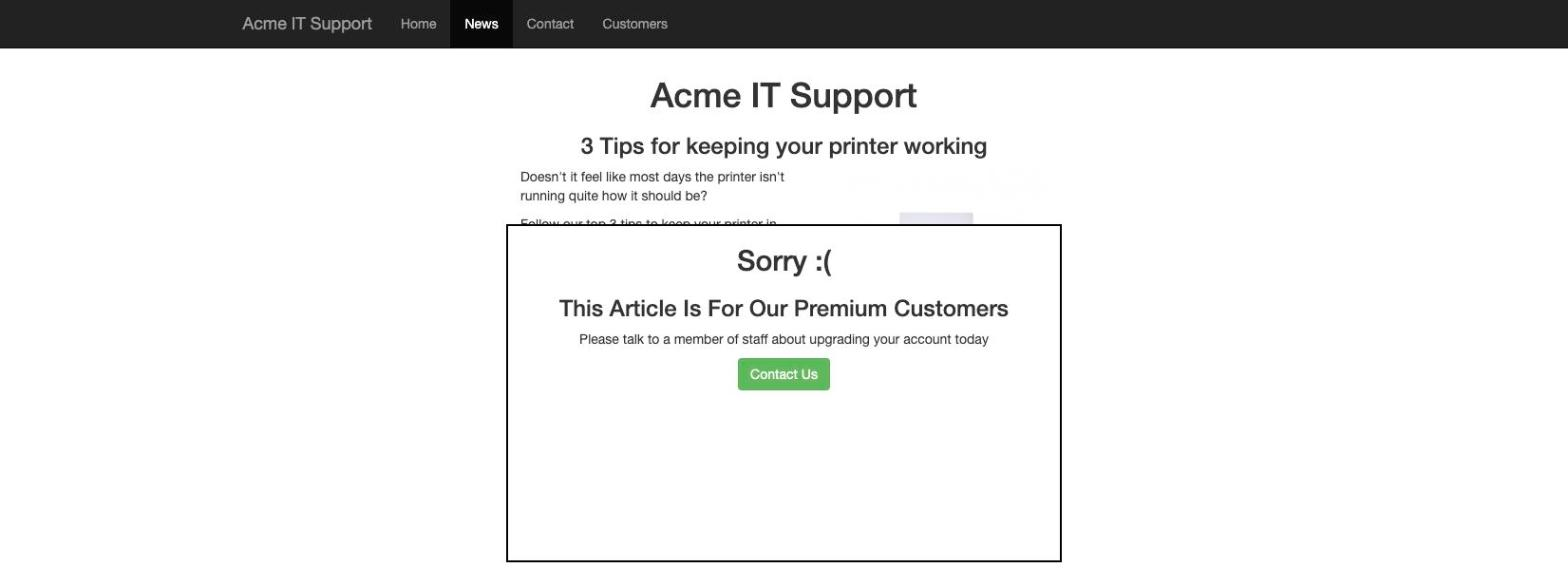
Deleting that div in the element inspector, or reading the CSS directly, reveals the article body, which contains a <div class="imgflag"> whose flag is a base64 PNG background image in style.css. Decoding it gives the flag as an image.
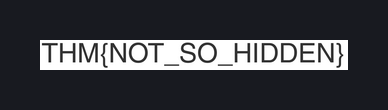
T4Q1 is THM{NOT_SO_HIDDEN} (3, 2, 6). A client-side paywall hides nothing: the content is already in the browser, the overlay only covers it visually.
Task 5: Developer Tools, Debugger
The contact page loads flash.min.js, which briefly flashes a red box on screen and then removes it after five milliseconds, far too fast to read. The debugger’s whole purpose here is to pause execution so you can catch it, but the flag never needs to be caught live, because it is built inside the (obfuscated) script itself:
// flash.min.js, simplified: the flag is assembled from a char-code array
let chars=[0x54,0x49,0x4f,0x7e,0x47,0x46,0x5a,0x4a,0x50,0x68,0x57,0x50,
           0x6b,0x56,0x54,0x6e,0x69,0x60,0x67,0x72,0x57,0x56,0x64,0x94];
// each character is String.fromCharCode(chars[i] - i)
python3 -c "c=[0x54,0x49,0x4f,0x7e,0x47,0x46,0x5a,0x4a,0x50,0x68,0x57,0x50,0x6b,0x56,0x54,0x6e,0x69,0x60,0x67,0x72,0x57,0x56,0x64,0x94]; print(''.join(chr(c[i]-i) for i in range(len(c))))"
  # THM{CATCH_ME_IF_YOU_CAN}
T5Q1 is THM{CATCH_ME_IF_YOU_CAN} (5, 2, 2, 3, 3). The setTimeout(..., 0x5) that removes the box after 5 ms is the “catch me if you can”, and reading the source beats trying to screenshot a five-millisecond flash.
Task 6: Developer Tools, Network
The contact form submits over AJAX. Watching the network panel while sending a message shows a background request to /contact-msg, and its JSON response carries a flag that never appears anywhere in the page.
curl -s -X POST "http://$T/contact-msg" --data 'name=a&[email protected]&msg=hi'
  # {"msg":"Message Received","flag":"THM{GOT_AJAX_FLAG}"}
T6Q1 is THM{GOT_AJAX_FLAG} (3, 4, 4). The network panel is the only place this flag exists, because it lives in an XHR response body, not the DOM.
Task 7: Developer Tools, Storage
After registering a customer account and logging in, the storage panel shows the cookies the site set. The question asks for the value of the HttpOnly flag on the session cookie, and the answer is false: the Set-Cookie header sets no HttpOnly attribute at all.
  # the login response: session cookie has no HttpOnly attribute
  # Set-Cookie: session=...; expires=...; Max-Age=3600; path=/
  # Set-Cookie: admin=false; ...
T7Q1 is false. A session cookie without HttpOnly is readable by any JavaScript on the page, which turns any XSS into session theft. The nearby admin=false cookie is a second, louder smell, a trust decision handed to the client to edit.
Two things worth keeping
The browser already shipped you everything the client can see. Every flag in this room lived in bytes the server sent to your browser: an HTML comment, a hidden link, an open directory, a framework version string, a paywalled article behind a CSS overlay, a flag assembled in JavaScript, an AJAX response body, a cookie attribute. None of it required an exploit, only the discipline to look. That is the entire argument for manual review before automation: a scanner counts status codes, a human reads the comment that says /new-home-beta.
When the prose and the mask disagree, trust the mask. The ticket endpoint returns 404 on a direct request and the modal posts somewhere else, but the 9/6/3 answer mask still pins the graded string to /customers/ticket/new. Counting the mask segments settled it before I wasted a submission, the same way the character counts confirmed every flag matched its box before I pasted it in.
Room solved 100%: 8 tasks, 11 answers.